
Turning a founder’s profile into a pipeline channel with thought leader ads? I’ll show you what works in our $65M+ LinkedIn panel in a free 30-minute call. Book my free call with Phil →
Ilic, P. (2026). How to Create a Great LinkedIn Profile in 2026 (With Examples). Kiin Labs (incorporating The B2B House). https://kiin.co/blog/linkedin-profile
- LinkedIn profile specs for 2026: the cheat sheet
- What is a LinkedIn profile?
- Why does a LinkedIn profile still matter?
- What does a LinkedIn profile help you do?
- How do you create a LinkedIn profile, step by step?
- What makes a good LinkedIn profile picture?
- What is the ideal LinkedIn profile picture size?
- What makes a good LinkedIn cover image?
- How do you write a LinkedIn headline?
- How do you write the About section?
- How do you describe your work experience?
- How do you use the Featured section?
- What happened to Creator Mode?
- How should founders and executives set up their profiles?
- How do you view your profile as others see it?
- How do you customise your LinkedIn URL?
- Figures previously published by The B2B House
Also: stats we no longer use · FAQ · every source
LinkedIn profile specs for 2026: the cheat sheet
If you only need the numbers, this is the table. Each row was checked on the LinkedIn Help Center page linked next to it on 14 November 2026. Where LinkedIn does not publish a limit and the number comes from the profile editor itself, the row says so.
| Profile element | 2026 rule | Source |
|---|---|---|
| Profile photo size | Between 400 x 400 and 7680 x 4320 pixels | LinkedIn Help: Photo won't upload |
| Profile photo file | PNG or JPG, 8MB maximum | LinkedIn Help: Photo won't upload |
| Cover image (background photo) | 1584 x 396 pixels recommended, JPG or PNG, under 8MB | LinkedIn Help: Add or change the cover image |
| Photo extras | Crop, filters, frames and visibility settings | LinkedIn Help: Edit your profile photo |
| Headline length | 220 characters in the editor (not published by LinkedIn Help) | LinkedIn Help: Edit your headline (steps only) |
| About section length | About 2,600 characters in the editor (not published by LinkedIn Help) | Profile editor |
| Skills | Up to 100 skills | LinkedIn Help: Add and remove skills |
| Featured section | Your posts or reposts, LinkedIn articles, external links, uploaded images, documents, presentations and videos | LinkedIn Help: Featured samples |
| Custom URL length | 3 to 100 characters, no spaces, symbols or special characters, cannot contain "LinkedIn" | LinkedIn Help: Manage your public profile URL |
| Custom URL changes | Up to 5 times in 6 months, first come first served, case insensitive | LinkedIn Help: Manage your public profile URL |
| Custom button | Some Premium Business, Sales Navigator and Recruiter Lite subscribers; 7 preset labels | LinkedIn Help: Custom button |
| Verification effect | Up to 60% more profile views, up to 50% more post engagement | LinkedIn Pressroom, 9 Dec 2025 |
| Creator Mode | Removed; tools and Follow button open to all members | Social Media Today, 5 Feb 2024 |
Sources: LinkedIn Help Center pages as linked, each opened 14 Nov 2026. The headline and About limits are not stated on any LinkedIn Help page we could find; they are the limits the profile editor enforces and could change without notice.
Cite: "LinkedIn profile photos must be at least 400 x 400 pixels and under 8MB; the cover image is 1584 x 396 pixels (LinkedIn Help Center, 2026)." Kiin Labs, kiin.co/blog/linkedin-profile#profile-specs
What is a LinkedIn profile?
A LinkedIn profile is your personal page on LinkedIn: a public record of your work, written by you, that other members, recruiters, buyers and search engines see when they look you up. It holds your photo, cover image, headline, About section, experience, education, skills, recommendations and a Featured section for your best work, and it is where every post you publish, every comment you leave and every connection request you send points back to.
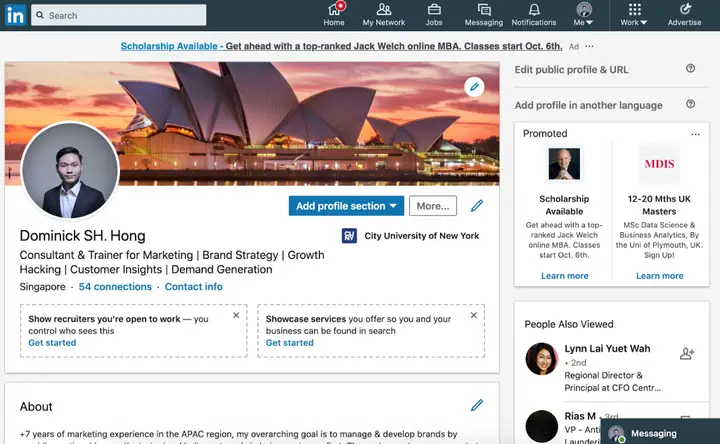
Think of it as the landing page for you as a professional. Everything else on LinkedIn sends traffic to it: your posts, your comments, your messages, and, if your company runs thought leader ads from your posts, its paid media too. Many people already have a LinkedIn profile, but far fewer have one that is finished and says clearly what they do and for whom. That gap is the opportunity. A complete, specific profile stands out because most do not.
A profile is not the same thing as a LinkedIn Page. A Page belongs to a company, school or showcase brand and has its own image specs (a 400 x 400 logo and a 1512 x 256 cover, per LinkedIn Help). This guide is about personal profiles.
Why does a LinkedIn profile still matter in 2026?
Because LinkedIn now has more than 1.4 billion members, and your profile is usually the first or second result when someone searches your name. When this guide was first written, LinkedIn had about 706 million members. It has roughly doubled since (LinkedIn About Us), and the full set of user, country and demographic figures is on our LinkedIn statistics 2026 page.
People use LinkedIn for personal and company branding, building trust, networking, finding jobs, generating leads and joining professional communities. All of those start with someone looking at your profile and deciding whether you are worth a reply. That decision happens in seconds and is based on your photo, your headline and the first lines of your About section.
Two things have raised the stakes since the original guide:
- Trust signals. LinkedIn's push on verification has made fake and half-finished profiles easier to spot. More than 100 million members had verified their identity or workplace by December 2025, and LinkedIn says verified members get up to 60% more profile views (LinkedIn Pressroom).
- Paid reach for people, not just companies. Companies can now sponsor posts from any member's profile as thought leader ads. When a founder's post is promoted to thousands of buyers, the founder's profile becomes the page those buyers click through to. We cover what that means for founders and executives in section 14.
The original guide also claimed LinkedIn was rated the most trusted social platform by Business Insider. That was true in Insider Intelligence's surveys from 2018 to 2021; Pinterest overtook it in 2022. The history is in our LinkedIn statistics archive.
What does a LinkedIn profile help you do?
A LinkedIn profile helps with four jobs: marketing yourself or your company, hiring and being hired, selling, and learning. The profile you need depends on which of the four matters most to you, so decide that before you write a word.
How does a LinkedIn profile help you with marketing?
Imagine you have a new technology to promote to other companies. You cannot reach the professionals who would care without a LinkedIn profile, and if your profile is weak they will ignore you. A good profile shows your story, your background, your company and the difference you are trying to make, so that members can find you, follow you and connect. Since Creator Mode was retired, every member can be followed rather than connected with, and every member can publish posts and articles. You also need a personal profile to run ads in Campaign Manager or to manage a company Page.
For B2B companies there is a newer reason. Posts from a founder's or employee's profile can be sponsored as thought leader ads, which in our panel engage at about four times the rate of company-page image ads. The profile behind those posts is part of the ad.
How does a LinkedIn profile help you with hiring?
LinkedIn is where recruiters look for candidates, and where candidates check out hiring managers. Without a profile, recruiters cannot find you; with a thin one, they skip you. LinkedIn's own guidance for members says to list your current position, industry, education and at least five skills, because recruiters search on exactly those fields (LinkedIn member guide). If you are hiring, the profile works the other way: candidates read yours before they reply to your message, and the #Hiring frame on your photo tells them you have roles open.
How does a LinkedIn profile help you with sales?
Most sales professionals use LinkedIn in one way or another, but most sales profiles still read like a CV. A clear value proposition in your headline and About section gives you an edge: when you send a connection request or a message, the buyer clicks your name, and a credible profile makes them more likely to accept and reply. We cover headline formulas that do this in section 09. If you have LinkedIn Premium Business or Sales Navigator, you may also be able to add a "Book an appointment" button straight to your profile (step 9 below).
How does a LinkedIn profile help you with learning?
People come to LinkedIn to learn from experts, peers and industry leaders. A profile lets you take part: comment on experts' posts, ask questions, and share what you learn. How you position your profile matters as much as how you interact, because people judge the book by its cover. You also need a profile to use LinkedIn Learning. The original guide said it had over 16,000 courses; LinkedIn does not publish a current count on a page we could open, and recent third-party estimates range from about 22,000 to 27,000, so we have not put a number on it.
How do you create a LinkedIn profile, step by step?
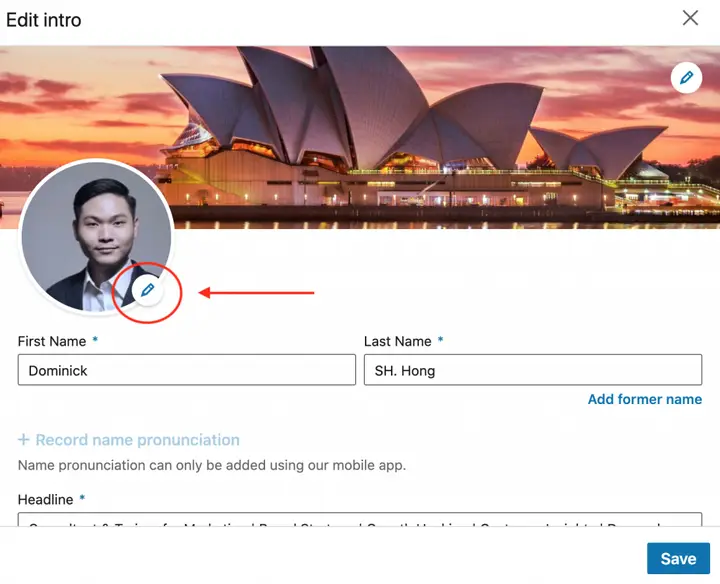
Add a photo, set your industry and location, write a headline, write your About section, fill in your experience, add volunteer work and skills, then add a Featured section, a custom URL and a verification. The first seven steps follow the original guide; steps 8 to 10 are features that did not exist, or barely existed, when it was written. In LinkedIn's 2026 interface almost everything starts from the same place: click Me, then View profile, then either the pencil (Edit) icon in your intro section or Add profile section.
Step 1: Add a profile photo
If your goal is to get noticed, add a photo of yourself. A headshot is the first thing visitors see, before they read anything. How you smile, how professional you look and how trustworthy you seem are all visual cues that form most of the first impression. LinkedIn's Help Center puts it simply: a profile photo "increases the credibility of your profile" (LinkedIn Help). LinkedIn's recruiting pages still say a photo brings 21x more profile views, 9x more connection requests and 36x more messages; those figures date from 2017 and are discussed in the archive.
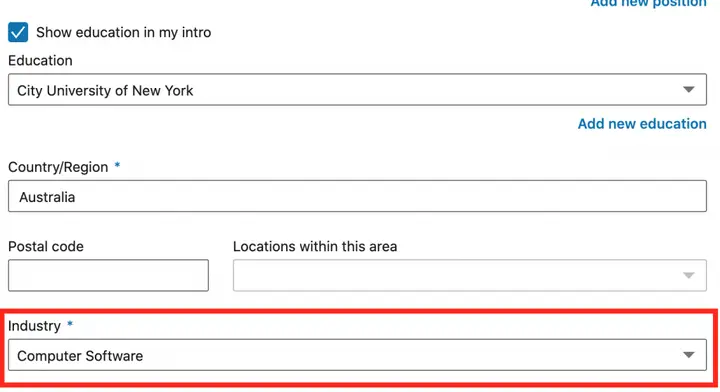
Step 2: Add your industry
Your industry is one of the fields recruiters and buyers filter on, so pick the one that matches the work you want to be found for, not necessarily your employer's. It sits in the intro section along with your location and contact info (LinkedIn Help). The original guide said more than 300,000 searches a week start with an industry filter and that adding one brings 9x more profile views; we could not trace a current source for either number (see the archive).
Step 3: Write your headline
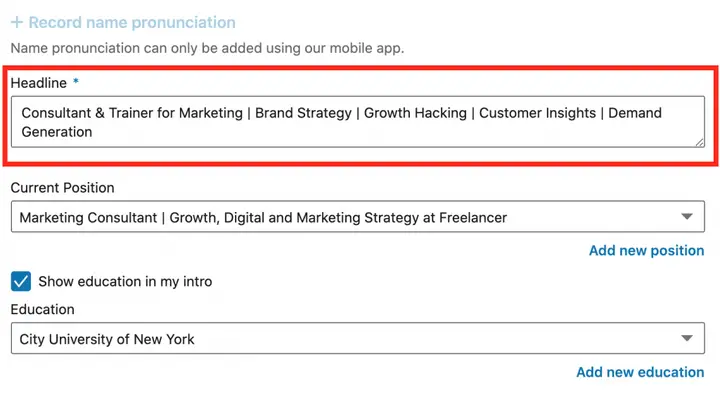
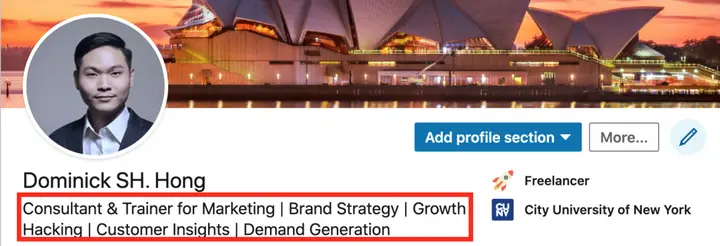
This is the text under your name and photo. It follows you everywhere: search results, comments, connection requests, and the top of every post. It is the single most important line for being found by recruiters or by people looking for someone who does what you do. Edit it from Me, View profile, the Edit icon in your intro section, then the Headline field (LinkedIn Help). Editing your headline does not change the Current, Previous and Education lines, so you are free to write something more useful than your job title. Nine headline formulas with examples are in section 09.
Step 4: Write a compelling About section
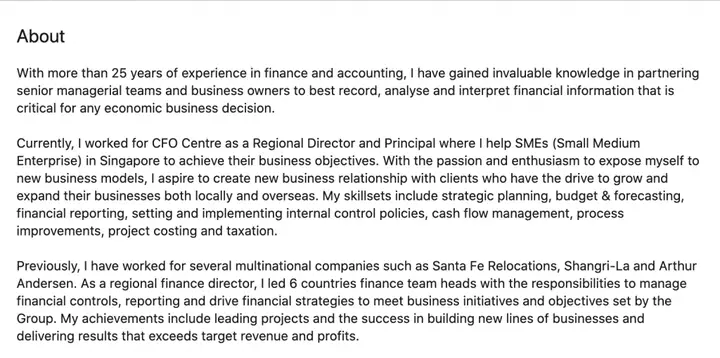
Your summary now lives in the About section, near the top of your profile. Since February 2024, when LinkedIn removed Creator Mode, About has moved back to the top of every profile (Social Media Today). This is your elevator pitch: if you had 30 seconds to explain what you are good at, why, and how you can help the reader, what would you say?
The original guide suggested keeping it short, about 40 words, focused on your accomplishments and where you are going, with an invitation to get in touch. That is still a good start, and the first two or three lines matter most because that is all people see before "see more". But best practices are there to be broken. If you have a story worth more than 40 words, tell it: the editor allows about 2,600 characters, and when everyone else zigs, a longer, specific About section can be how you zag.
Step 5: Fill in your professional history
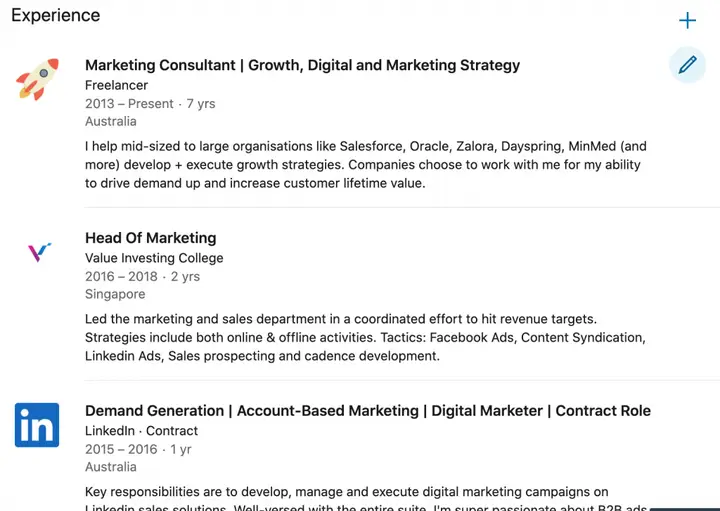
Your experience lets visitors judge your past roles, results and current position. Seeing how your career developed helps them decide whether you are an authority or just starting out. LinkedIn's member guide says listing a current position can bring up to 10x more messages that create opportunity (LinkedIn); the original guide's longer version of that claim is in the archive.
Do not stop at text. Each position can carry media: photos, presentations, documents, videos and links. Use them to show the work rather than describe it, so your profile tells a visual story.
Step 6: Add volunteer experience and causes you care about
This can feel unnecessary, but volunteer work and causes give visitors a glimpse of what you care about outside work, and leadership roles in other organisations can back up your professional skills. The original guide said this brings 6x more profile views. LinkedIn has not republished that figure; it is kept in the archive with its history. Add it from Add profile section.
Step 7: Add skills and get endorsed
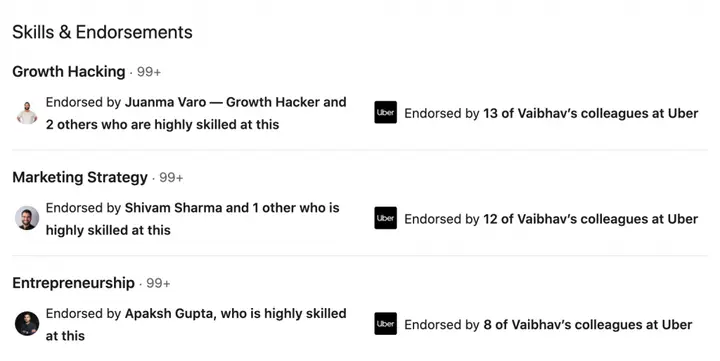
Skills are how LinkedIn's search and recruiters' filters match you to queries. You can add up to 100 skills, and when you add one LinkedIn asks where you used it, so you can attach it to a specific job or course (LinkedIn Help). Add at least five: LinkedIn's member guide says members with five or more skills "are discovered up to 27x more in searches by recruiters" (LinkedIn). Endorsements from people who share the skill count as social proof, so the more relevant ones you collect, the stronger your profile looks.
Step 8 (new): Add a Featured section
Featured lets you pin posts, articles, links and media near the top of your profile. It is the closest thing a profile has to a homepage hero. Add it from Add profile section, then Recommended, then Add Featured (LinkedIn Help). Examples are in section 12.
Step 9 (new): Add a custom button, if you have it
Some Premium Business, Sales Navigator and Recruiter Lite subscribers can add a button to their profile that links to a URL of their choice, with one of seven labels: Visit my store, Visit my website, View my portfolio, View my blog, Book an appointment, View my newsletter or View my services. It shows on your profile and, unless you switch it off, in search results, messages and the feed. Adding it replaces any services you listed on your profile (LinkedIn Help). For sales and founder profiles, "Book an appointment" pointed at a calendar is the obvious choice.
Step 10 (new): Verify your identity and workplace
Verification adds a badge next to your name confirming your identity or your employer. More than 100 million members had done it by December 2025, and LinkedIn says verifications help members get up to 60% more profile views and up to 50% more engagement on their posts (LinkedIn Pressroom, 9 December 2025). It costs nothing and takes a few minutes, which makes it the cheapest improvement in this guide.
Cite: "LinkedIn says verified members get up to 60% more profile views and up to 50% more engagement on their posts (LinkedIn, December 2025)." Kiin Labs, kiin.co/blog/linkedin-profile#basics-how-to-create-a-linkedin-profile
What makes a good LinkedIn profile picture? (With examples)
A good LinkedIn photo is recent, shows your face clearly filling most of the frame, matches how you dress for work, and has an expression your audience would want to talk to. Here is what the eight strong profile pictures in the original guide had in common, followed by the five tips they share.
Illustration. The original B2B House guide showed eight profile photos of well-known business leaders; we describe what they had in common instead of reproducing their photos.
LinkedIn profile picture tip 1: use a recent photo that looks like you
Choose a picture that looks like you do now. Do not use a photo from ten years ago. The test: if someone would not recognise you from your photo when they meet you, you need a more recent one. This matters more with verification badges and video calls in the mix; a mismatch between photo and person now reads as a trust problem, not just vanity.
LinkedIn profile picture tip 2: your face should fill the frame
Your face should take up more than 60% of the photo. Avoid long-distance shots. LinkedIn's editor lets you crop, zoom and reposition after upload (LinkedIn Help), so zoom in until your face is clear. Remember the photo shows as a small circle next to every comment and post, so detail that works at full size disappears.
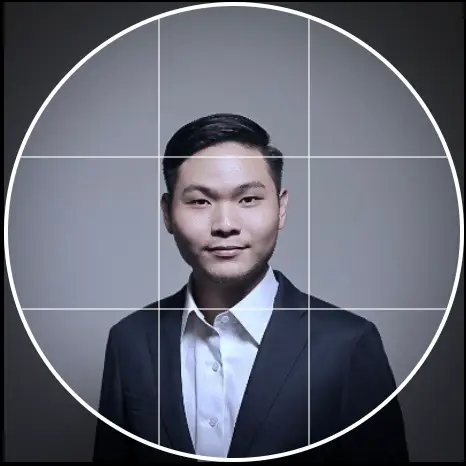
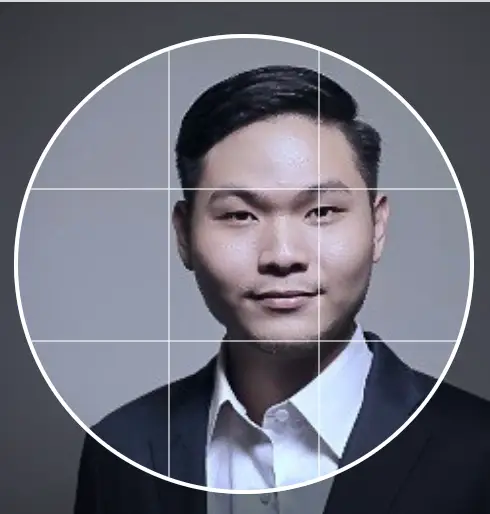
LinkedIn profile picture tip 3: dress the way you do for work
The rule of thumb is to wear what you usually wear to work. There is no hard rule; it comes down to the impression you want people to have. A founder of a developer tools company in a suit will look as out of place as a law firm partner in a hoodie.
LinkedIn profile picture tip 4: choose the right expression
Do not look angry, and do not look blank. Smile; it does not have to be a big, toothy smile, just an approachable one. This matters most in sales, where looking likeable makes people more willing to talk to you. Which of these would you reply to?
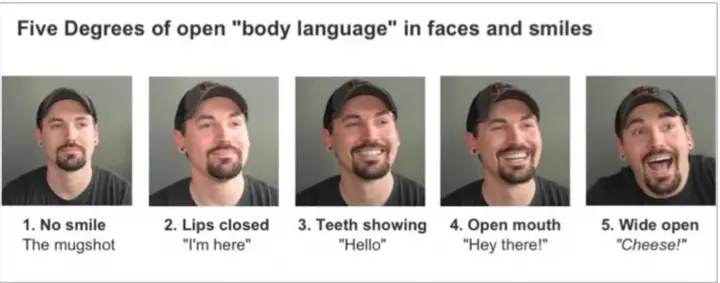
If your brand calls for a more serious look, that is fine too. Match your expression to what your audience expects.
LinkedIn profile picture tip 5: use filters, frames and visibility carefully
LinkedIn added photo filters and editing in 2017, and they are still in the photo editor along with crop, position, size and rotation (LinkedIn Help). Use a filter that brings your photo to life, not one that changes how you look. Two settings are new since the original guide: Frames, such as #OpenToWork or #Hiring, which tell visitors your status at a glance, and photo visibility, which controls who can see your photo. For a public-facing professional, set visibility to all LinkedIn members.
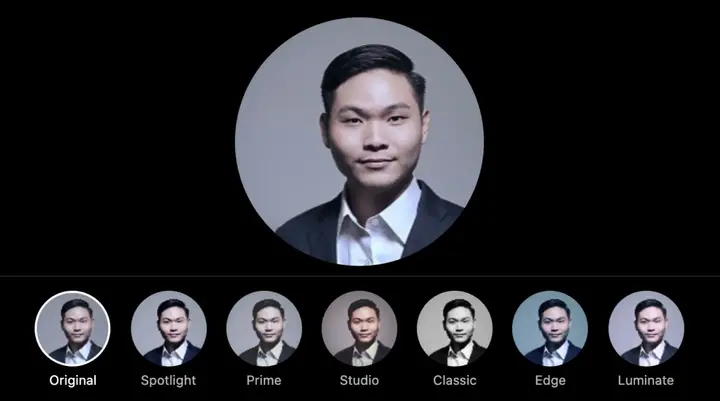
Taking a good profile picture. A professional headshot is best, but a recent phone photo in good daylight, against a plain background, with your face filling the frame beats a cropped wedding photo every time. Conferences and LinkedIn events often have free headshot booths.
What is the ideal LinkedIn profile picture size?
Upload a square photo of at least 400 x 400 pixels, as a PNG or JPG under 8MB. LinkedIn accepts profile photos between 400 x 400 and 7680 x 4320 pixels (LinkedIn Help, Photo won't upload). The original guide's numbers have held up: 400 x 400, 8MB maximum, PNG or JPG. GIFs were not supported then and LinkedIn's Help Center still lists only PNG and JPG.
| Image | Size | File | Notes |
|---|---|---|---|
| Profile photo | Minimum 400 x 400 px, maximum 7680 x 4320 px | PNG or JPG, up to 8MB | Displays as a circle; keep your face central |
| Cover image (personal profile) | 1584 x 396 px recommended | JPG or PNG, under 8MB | Photo overlaps the bottom left on desktop |
| Company Page logo | 400 x 400 px recommended | PNG or JPEG, up to 3MB | For Pages, not profiles |
| Company Page cover | 1512 x 256 px | PNG or JPEG, up to 3MB | For Pages, not profiles |
Sources: LinkedIn Help, Photo won't upload to your profile; LinkedIn Help, Add or change the cover image on your profile; LinkedIn Help, Image specifications for LinkedIn Pages. All opened 14 Nov 2026.
In practice, upload something larger than the minimum, for example 800 x 800 or 1000 x 1000 pixels, so it stays sharp on high-resolution screens, and keep the file comfortably under 8MB. If an upload fails, LinkedIn's troubleshooting page says to check the file type, the file size and the pixel size first.
Cite: "LinkedIn profile photos must be between 400 x 400 and 7680 x 4320 pixels, PNG or JPG, up to 8MB (LinkedIn Help Center, 2026)." Kiin Labs, kiin.co/blog/linkedin-profile#what-is-the-ideal-linkedin-profile-picture-size
What makes a good LinkedIn cover image? (With examples)
A good cover image tells visitors in a split second what you do and what you want them to do next, at 1584 x 396 pixels. LinkedIn now calls the background photo the cover image (LinkedIn Help). Start with your brand: what do you want other professionals to know you for? A speaker? A service? A coach? A product? Then pick one of the angles below. Keep important text away from the bottom left, where your profile photo sits on desktop, and check it on a phone, where the image is cropped more tightly.
Cover image example 1: say who you help and how to reach you
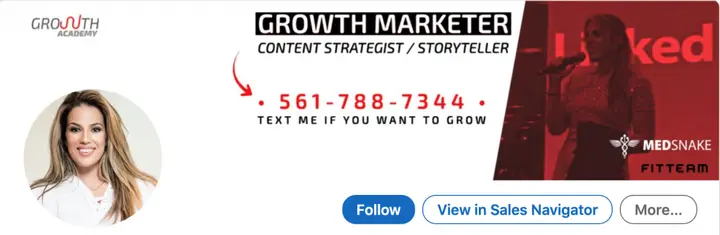
This is a clear call-out to her audience and what she offers. There is no second-guessing what she provides or how to reach her. The photo on the right, of her on stage, shows authority; even with a red overlay you can tell she speaks. Her logo sits top left. An overall well-branded cover image, finished off with a strong profile picture.
Cover image example 2: a clear call to action
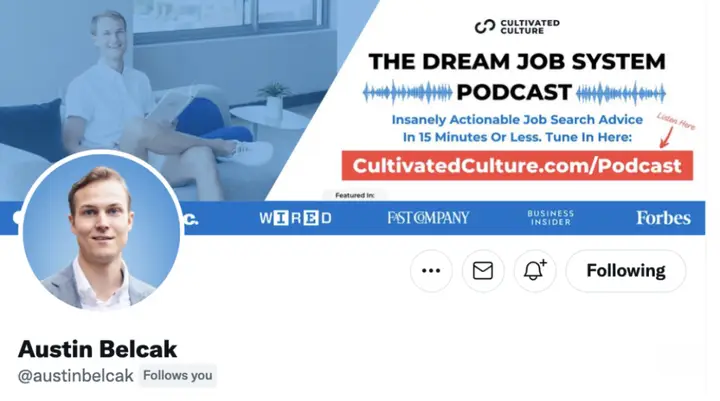
Austin Belcak's cover has a strong call to action: sign up for his podcast and visit his website. Be clear, not clever. Other actions a cover image can drive:
- Building brand awareness.
- Subscribing to your newsletter.
- Visiting your website.
- Buying a digital product or service.
- Following you on LinkedIn or other social media.
- Booking a call, which pairs well with the custom button if you have it.
Cover image example 3: the brands you work with
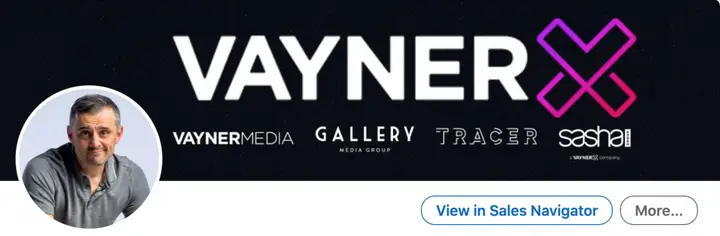
Another angle is to show the brands you run or support, or the customers you have worked with. The point is that your brand is seen. This works especially well for founders and for people in marketing or sales, because it lines up your profile with your company's branding.
Cover image example 4: borrowed authority
Have you shared a stage with well-known people in your industry? A cover image of you with recognised leaders makes others associate you with them; psychologists call it the halo effect. The original guide's example was Jennifer Lopez, known to most people as an actress, whose cover showed her on stage with Arianna Huffington to position her as a business leader. (That screenshot was hosted outside The B2B House and is no longer available, so it is not shown here.) Use this angle only if the photo is genuine and recent.
Cover image example 5: logos as trust signals
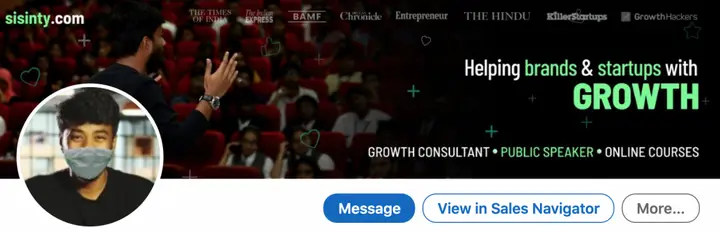
What stands out here are the big brands he has worked with or been featured in, such as Entrepreneur, GrowthHackers and The Hindu. They could be bigger, but they work as trust signals the moment someone lands on the profile. The photo was taken during the Covid-19 pandemic, hence the mask; in 2026 you would use a newer one.
Cover image example 6: give people a reason to follow
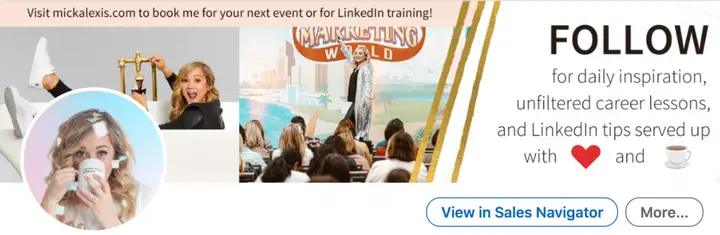
If you want visitors to take one action, the cover image is the place to ask. "Follow" is the action here, and she gives a reason to. If you want someone to act when they visit your profile, tell them what is in it for them. It helps that she is shown speaking at Social Media Marketing World in the centre, and that her website is top left. Following is now open to every profile, not just Creator Mode users, so this works for anyone.
How do you write a LinkedIn headline? (With examples)
Write a headline that says who you help, what result you get them and why you are credible, using the words your audience would search for, in up to 220 characters. As people scroll the feed or search results, the two things they see are your photo and your headline, which makes the headline as important as the photo. Only the first part shows in search results, comments and notifications, so put the most important words first.
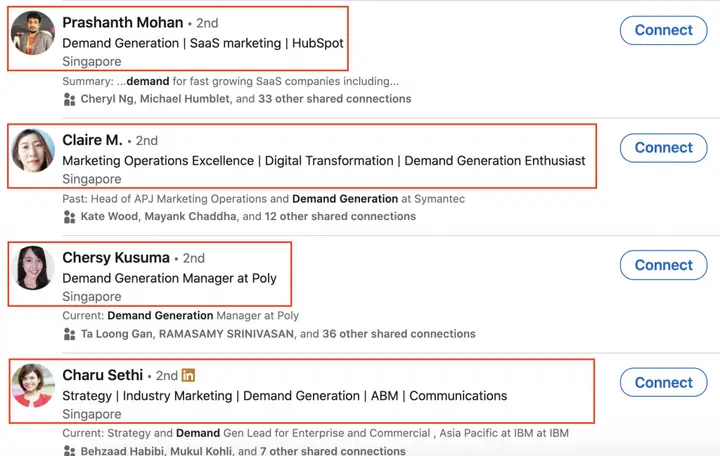
Start with four questions. Which keywords do you want to appear for? What do you want to be known for? What is your value proposition? Why should people talk to you? If you are stuck, search LinkedIn for the keyword you want to rank for and study the top five profiles. Which words do they share? Use them too, but do not copy anyone's headline; be original. Here are nine formulas.
Headline example 1: the straightforward job title
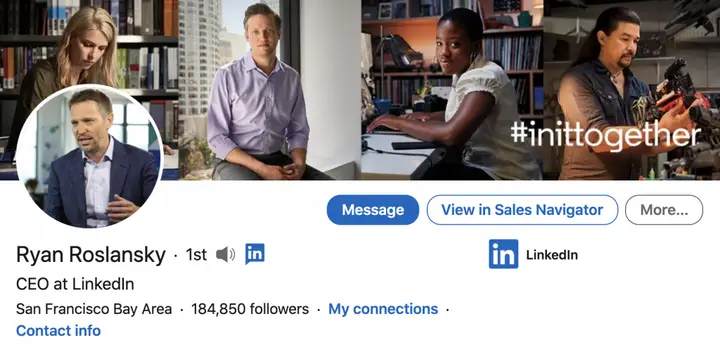
If your title is impressive on its own, say it: CEO at LinkedIn, CMO at Salesforce, VP Marketing at Netflix. This example has dated in an instructive way. It was Ryan Roslansky's headline as LinkedIn's CEO; LinkedIn's About page now lists Dan Shapero as CEO and Roslansky as former CEO (see our LinkedIn statistics). A title-only headline is only as current as your title, so update it the day it changes.
Headline example 2: your company's achievement
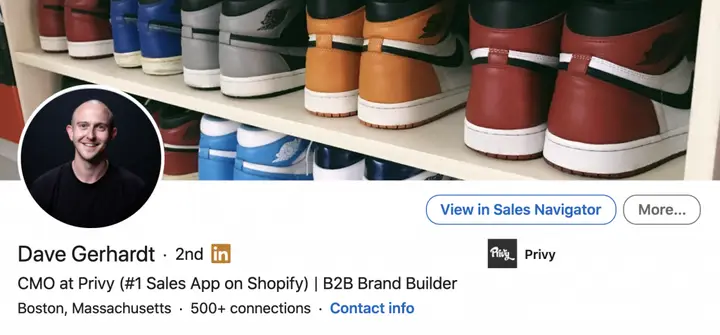
Call out what your company has achieved. Dave Gerhardt's headline used his company's "#1 Sales app on Shopify" claim, which reflects well on him because he was in a marketing and sales role. It works best when the achievement is specific and checkable.
Headline example 3: be specific about what you achieved
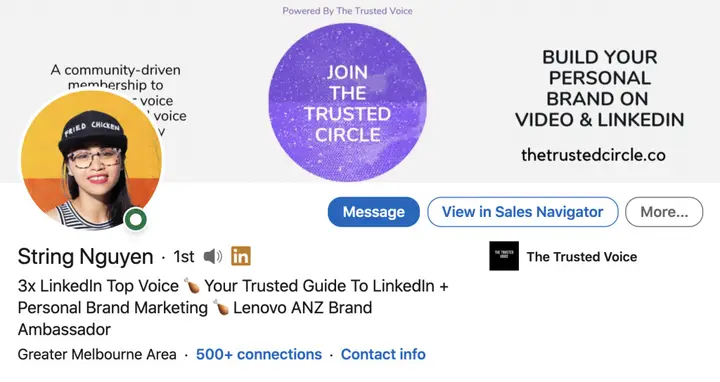
"3x LinkedIn Top Voice" grabs attention because it is specific. String Nguyen also uses emojis to stand out (the chicken wing is part of her personal brand) and still includes the keywords people search for, in her case personal brand marketing. Use emojis sparingly; they help you stand out in a list but some search and screen readers handle them badly.
Headline example 4: unique certifications or qualifications
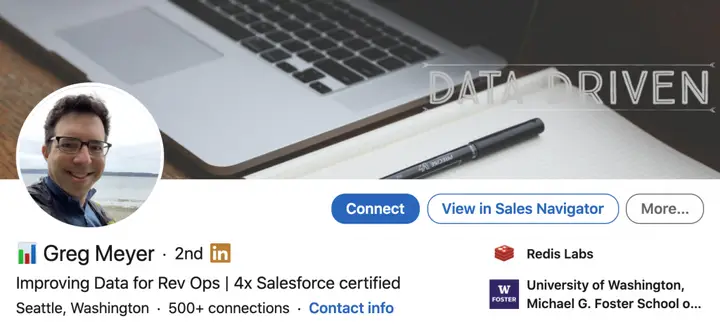
If you hold certifications that are hard to get, list them, then say how you use them to help others. A certification alone is a credential; a certification plus an outcome is a reason to talk to you.
Headline example 5: your book, podcast or content
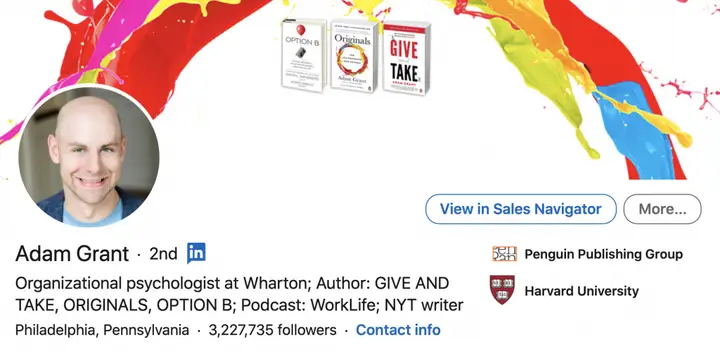
Most of us are not bestselling authors, but you can still list what you publish: a newsletter, a podcast, a YouTube channel or a blog. Only call yourself a bestselling author if you are one. Inflated claims backfire.
Headline example 6: a call to action
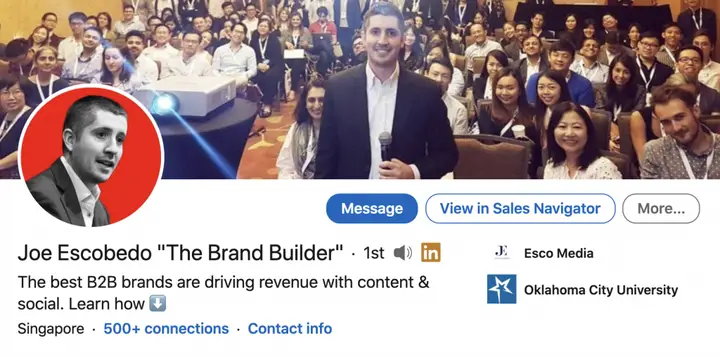
What do you want profile visitors to do? If you want them to follow you, say so, and point at the button. Joe Escobedo's headline ends with "Learn More" and a down arrow that directs attention to his content below. In 2026 the Featured section and, if you have it, the custom button do the same job more directly.
Headline example 7: the problem you solve
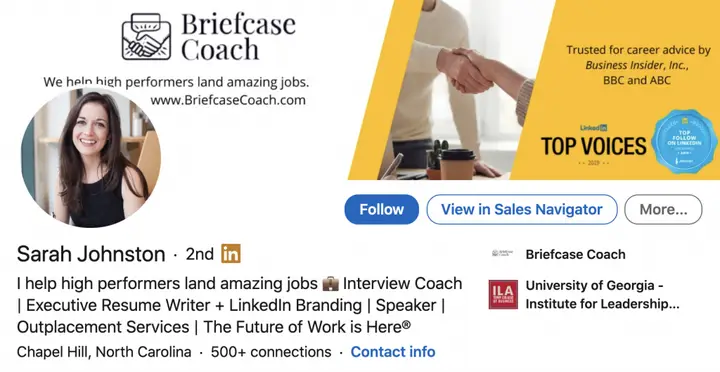
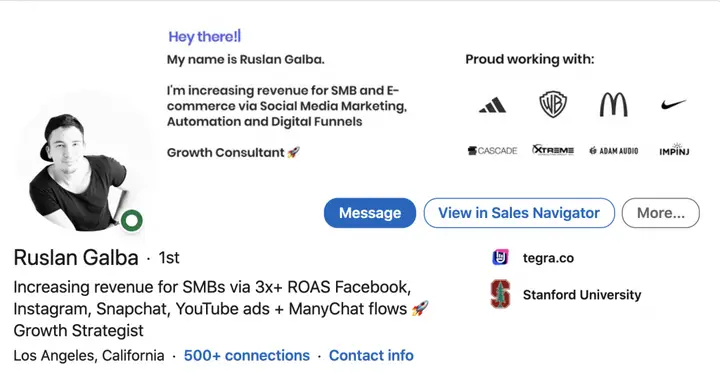
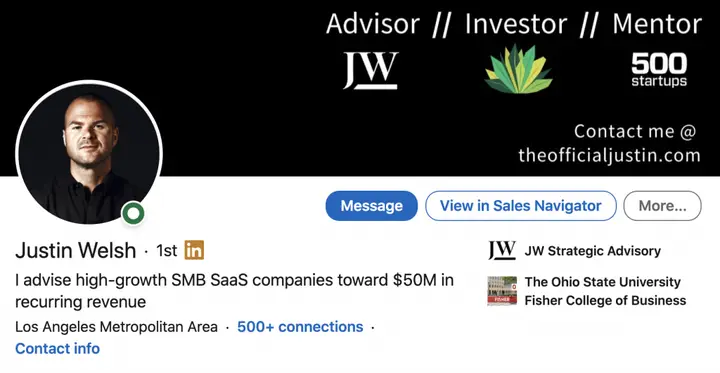
This is where your value proposition fits. What challenge do you solve, how, and with what results? In all three examples you can see exactly what service they offer and which audience they serve; measurable results and specific benefits make them stand out. The simplest version: "I help (audience) to (achievement)." For B2B founders and sales leaders this is usually the best formula, because a buyer who clicks through from an ad or a message needs to know in one line whether you are relevant.
Headline example 8: keyword stuffing
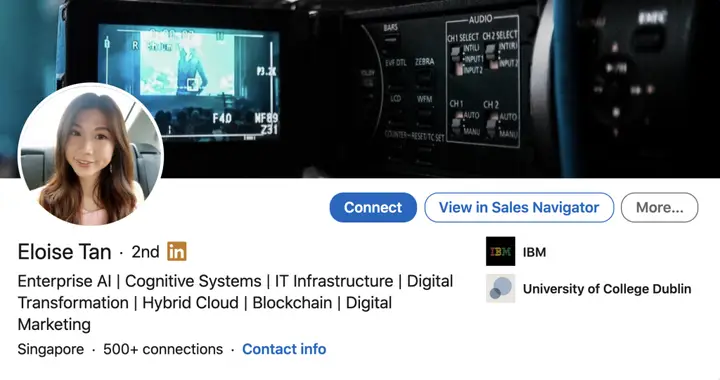
Keyword stuffing means packing in every keyword you want to be known for, whether or not it makes a sentence. The original guide was on the fence and so are we. It can help you appear in search, but it says nothing about what you do for people or what problems you solve. And if your goal is ranking in LinkedIn search, your experience descriptions and skills matter at least as much as your headline, so stuffing the headline is not necessary.
Headline example 9: the product headline
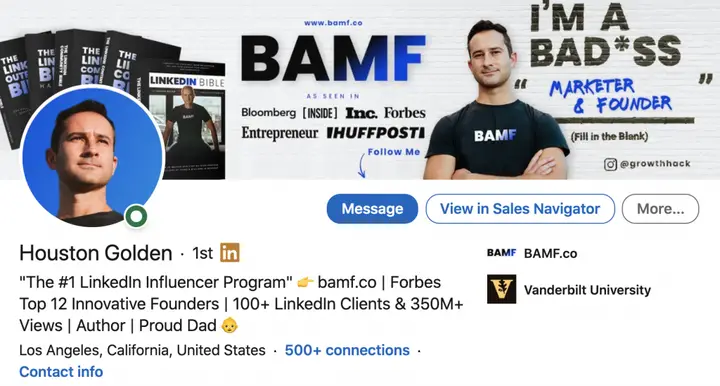
You can name your product and add a call to action. It rarely works on its own; a headline that is only a product name makes you look like a billboard. Tie the product to proof: results, customers, numbers. Do not just say it is good; show it.
How do you write the LinkedIn About section? (With examples)
Open with who you help and how to contact you, then prove it with results, then say how people can work with you, and end with a call to action. The first two or three lines are all most visitors see, so they have to carry the point. The original guide recommended running your profile, or the profile of someone you admire, through a profile-scoring tool such as Resume Worded and applying its suggestions; tools like this still exist and are a useful check, but the four structures below will get you most of the way.
About section example for small business owners
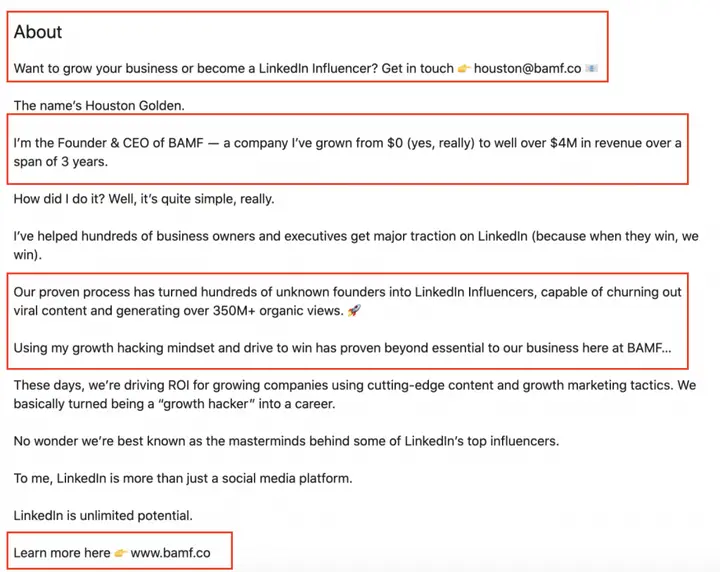
What stands out is the call to action right at the start. The summary opens with a question that qualifies the reader: in one sentence you know whether he can help you and how to contact him. Not everyone reads the whole thing, but they already know how to get in touch. He then introduces himself and his achievement, impressive without being self-centred. The middle explains his process for getting clients a return. The end repeats the call to action. Remind people what you want them to do.
About section example for service providers
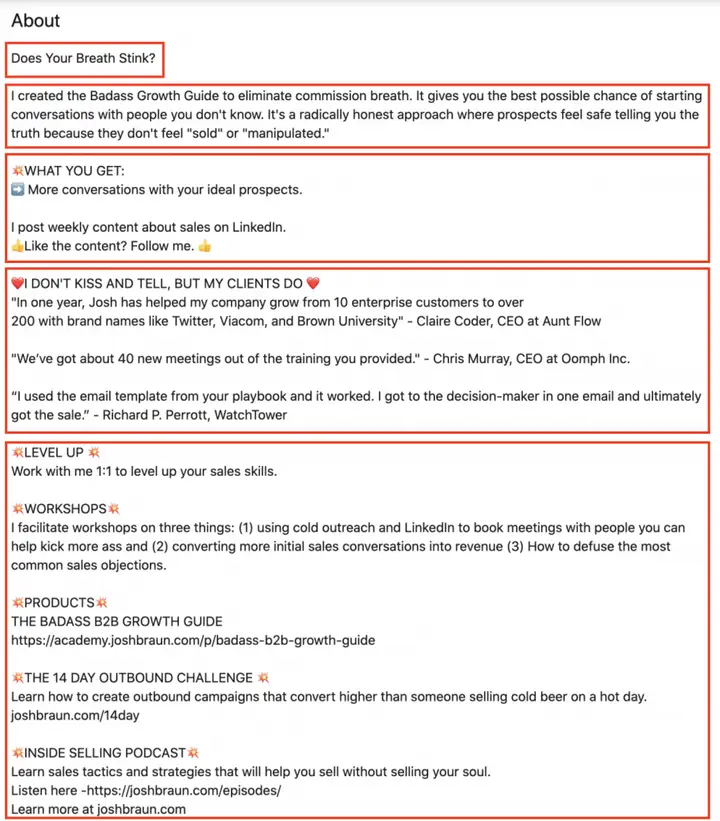
This one opens with something provocative, which grabs attention and makes you want to read on. It then bridges into what he offers and the problems he solves; if you are not his audience you will probably leave, which is a useful filter. Next comes what is in it for the reader and how to get involved. Then something we rarely see and love: customer testimonials. If you have case studies and quotes, put a few in your About section. It closes with the services he offers and a clear call to action.
About section example for influencers and established leaders
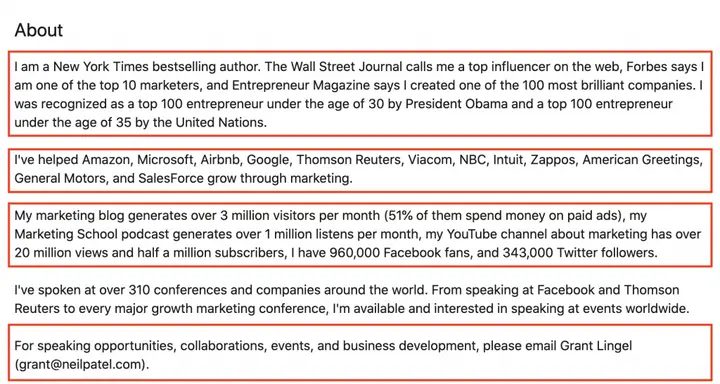
If you have a long record of achievements, as an individual or with your company, this structure suits you. It can read as boastful, but it establishes authority fast. The first part lists personal achievements, the second company achievements, the third specific return-on-investment numbers. It ends with a clear call to action and how to connect.
About section example for marketing
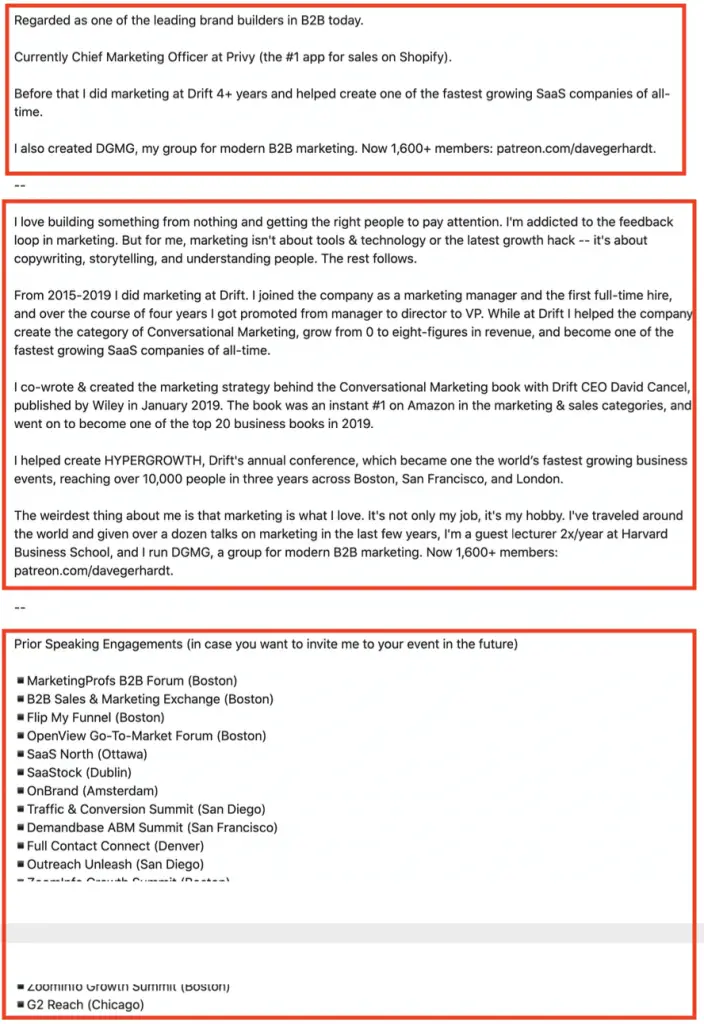
This one opens with what he wants to be known for: brand builder. Although it is a marketing example, the formula works for any function or industry: "Regarded as the leading (your function) in (your industry)." The first part summarises his biggest past and present achievements, a snapshot of who he is and why you should trust him. The next goes into what he believes, and reviewing past achievements in detail gives the summary weight; people respond to stories. The final part lists where he has spoken. That is social proof. If you have not spoken anywhere, list testimonials or customers instead.
For founders. If your posts run as thought leader ads, your About section is read by people who did not choose to follow you; they saw a sponsored post and clicked your name. Write the first two lines for them: what your company does, for whom, and one proof point, before anything about your career.
How do you describe your work experience on LinkedIn? (With examples)
Open each role with what the company does and what you own, then use short bullets with specific, measurable results. Your experience section should be close to your CV, so if you already have a strong CV, start from that. Each role can also carry media, and LinkedIn asks which skills you used where, which helps you appear in searches for those skills.
Work experience example 1: get straight to it
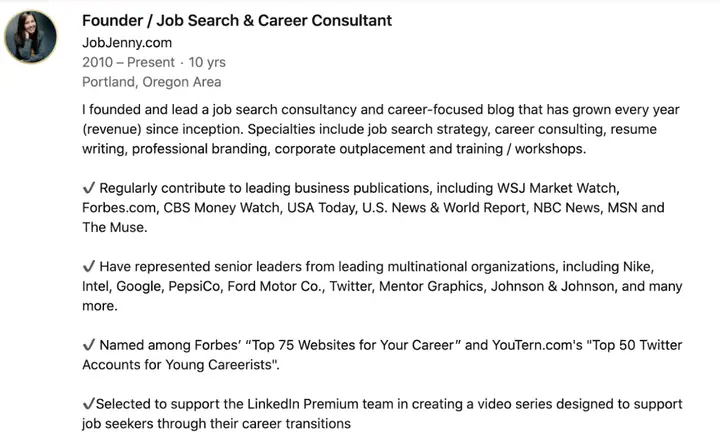
This example gets right into it: what the company is, her role and her specialities, all in the first paragraph. Bullets then go into her top achievements. What makes bullets land is specificity. Notice how she names the brands she worked with consistently; that builds authority.
Work experience example 2: numbers and team size
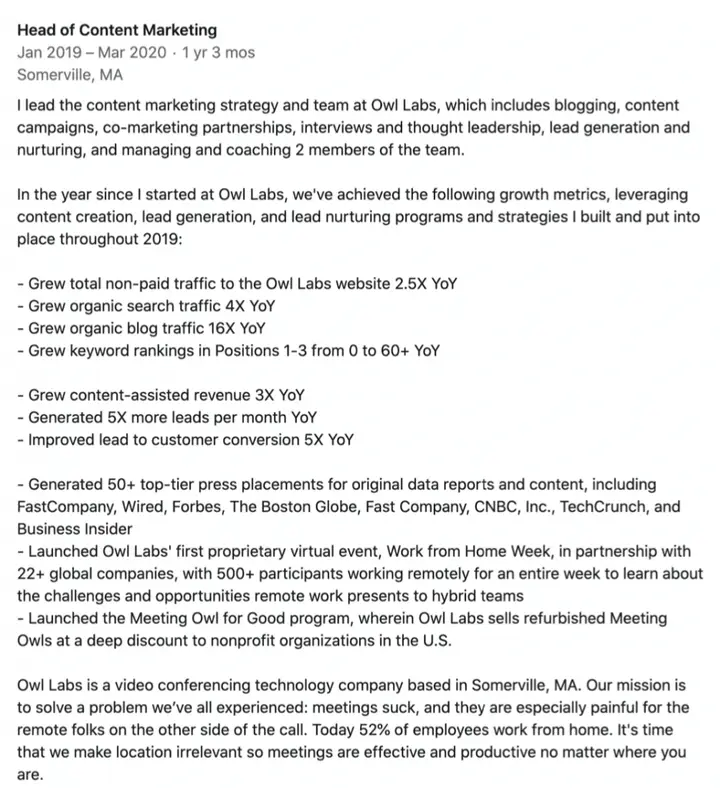
Here you can see how much more compelling a role becomes with statistics and results. If you lead a team, say how big it is. Some would call this description too long, but length is relative: detail is fine as long as every point matters and none repeats.
Work experience example 3: sell the company
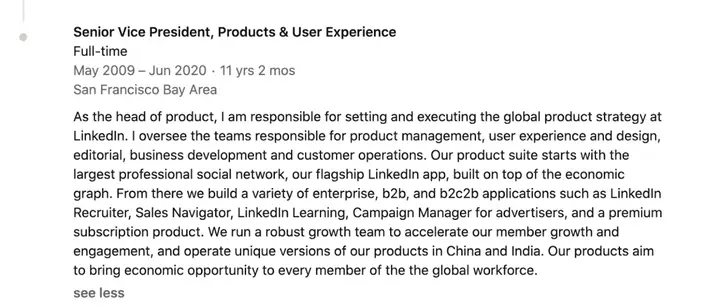
If you are a leader or work in sales or marketing, position your current role differently. Talk more about the company: the products you are building and the mission you believe in. Why? Because if your job is to sell the company, your current role is prime space to do it. For founders, this entry is often the second thing a prospect reads after the headline, so treat it like the first paragraph of your homepage.
How do you use LinkedIn's Featured section? (With examples)
Use Featured to pin your best proof near the top of your profile: a service or product page, your best-performing posts, a document or video, and a final item with a clear call to action.
What is the LinkedIn Featured section?
Featured shows samples of your work to anyone who views your profile. According to LinkedIn's Help Center it can hold LinkedIn posts you created or reshared, articles you published on LinkedIn, links to external websites such as a blog or portfolio, and uploaded media: images, documents, presentations and videos. You cannot feature posts from LinkedIn Events or Groups, and once you remove a sample from Featured it cannot be restored (LinkedIn Help). The original guide dated the launch to February 2020; LinkedIn's Help Center does not give a launch date, so we have left that as published.
Where is the Featured section?
On desktop: Me, View profile, Add profile section, then the Recommended dropdown, then Add Featured. Click the Add icon in the top right of the Featured page, choose the type of sample and follow the prompts. To edit or reorder, scroll to Featured and click its Edit icon; you can reorder once you have at least two items, and edit the title and description of each (LinkedIn Help).
LinkedIn Featured section examples
Here is how others use their Featured sections.
Feature your solutions
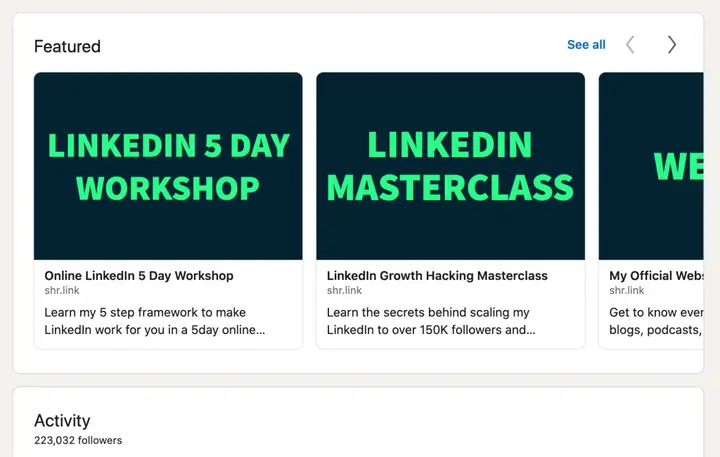
Be clear in the image about the services you offer. Only the start of the description shows, so use it to call out your audience or say what they will get when they click. These examples link straight to service pages.
Add documents, images, videos and presentations
You can upload documents, images, videos and presentations directly. Show your best content here and use it to establish yourself as a thought leader. Do not be afraid to give your best ideas away; that is how you build leads, connections and credibility.
Use your top posts and articles
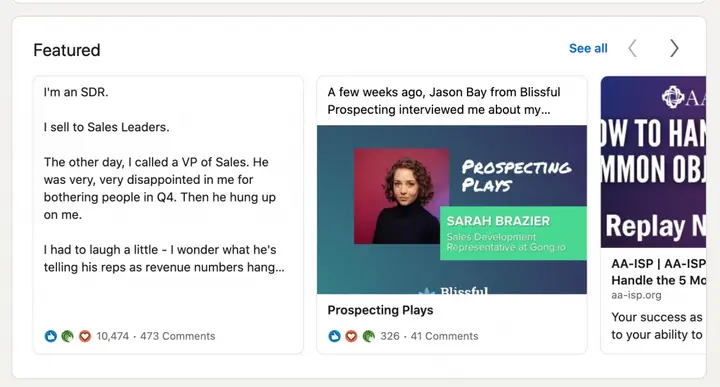
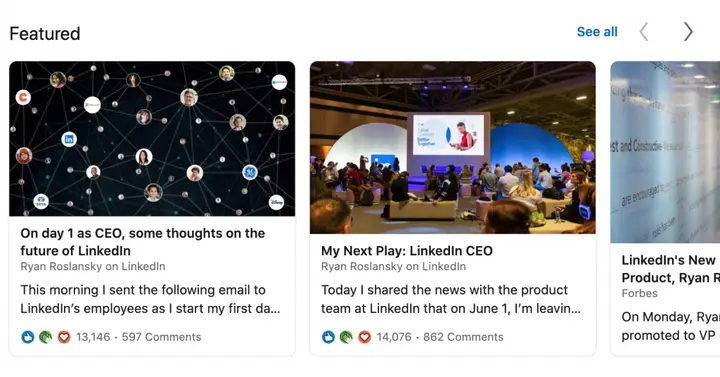
If your posts and articles get strong engagement, feature them. They show the engagement you have earned and reinforce you as someone worth listening to. This is especially useful for CEOs and senior executives, because people want to hear their view of the industry. If your company sponsors one of your posts as a thought leader ad, pin that post in Featured too, so people who click through from the ad see it again at the top of your profile.
End with a strong call to action
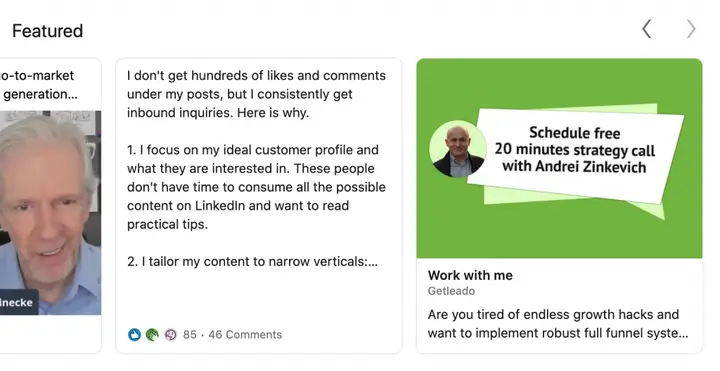
End strong. Say plainly what you want people to do and how you want to be contacted. Notice how large the Featured images are? Design them yourself and put the call to action inside the image.
What happened to LinkedIn Creator Mode?
LinkedIn removed Creator Mode in early 2024: profile hashtags went in February 2024, the on/off switch went in March 2024, and its tools were opened to all members. Social Media Today reported LinkedIn's statement on 5 February 2024: LinkedIn wanted "to bring the best of Creator Mode to more" members, and would open "additional creation tool access and deeper analytics to all members", "removing the need to toggle creator mode on and off" (Social Media Today).
| Creator Mode feature | Status in 2026 |
|---|---|
| Follow as the main button on your profile | Follow is available to all members |
| "Talks about" profile hashtags | Removed, February 2024 |
| Creator Mode switch in settings | Removed, March 2024 |
| About section moved below Featured | About is back at the top of the profile |
| Newsletters, LinkedIn Live, audio events | Opened to more members; some still have eligibility criteria |
| Creator analytics | LinkedIn said deeper analytics would open to all members |
| Existing creators' access | Kept |
Source: Social Media Today, "LinkedIn's removing its Creator Mode option", 5 Feb 2024, quoting LinkedIn.
What this means for your profile: there is nothing to switch on. If you want people to follow rather than connect, ask them to in your headline or cover image, and make your Featured section and recent posts worth following. Since hashtags no longer appear on profiles, your headline, About section and skills carry all of your keywords.
How should founders and executives set up their LinkedIn profiles?
Set them up as the landing page for the company's thought leader ads and founder-led content: a clear headline about who the company helps, an About section written for buyers, Featured items that point to the product, and a verified badge. This is where profile advice stops being about careers and starts being about pipeline.
A thought leader ad is a LinkedIn ad in which a company sponsors a post published from a person's profile instead of its company Page. Since March 2025 a company can sponsor posts from any member, not only its employees, with the author's approval (Social Media Today, Sept 2026). LinkedIn says thought leader ads drive a 252% higher click-through rate than conventional single image ads (LinkedIn data, 2025) and 4.2x more bottom-of-funnel conversions per company when they are part of a full-funnel plan (LinkedIn data, 2026) (LinkedIn Marketing Solutions). The ad can be a single image or video post; posts with multiple images, polls or documents cannot be promoted, and only the author can edit the post (LinkedIn ads guide).
| Thought leader ad statistic | Figure | Source |
|---|---|---|
| Engagement rate, thought leader ads vs company-page single image ads (median account) | 4.7% vs 1.2% | Kiin Labs, 408 / 856 accounts |
| Engagement, top 10% of authors vs bottom 10% | 8.6x (10.55% vs 1.22%) | Kiin Labs, 47 authors |
| Share of engagement variance explained by the author | 67% | Kiin Labs |
| Thought leader ad clicks that never reach a landing page | 91% | Kiin Labs |
| CTR vs conventional single image ads | +252% | LinkedIn data, 2025 |
| Bottom-of-funnel conversions per company, with full-funnel investment | 4.2x | LinkedIn data, 2026 |
Kiin Labs figures: Kiin panel, $65M+ of LinkedIn ad spend across 1,000+ advertiser accounts, 8 Sep 2025 to 7 Sep 2026, medians across accounts, Audience Network excluded; full method in LinkedIn Thought Leader Ads Benchmarks 2026. LinkedIn's figures are its own and its method is not published.
Two of those numbers explain why the profile matters. First, the author matters more than the post. In our panel the person whose profile the ad runs from explains 67% of the variance in engagement across accounts, and no hook, length or link choice survives holding the author constant. The face, name and headline that appear on the ad are profile fields. Second, most clicks go to the person, not your website. 91% of the clicks LinkedIn reports on thought leader ads are not landing page clicks; they are reactions, comments, "see more" and profile visits. A share of the people you paid to reach end up on the founder's profile, and what they find there decides whether they follow, connect or book.
Before we run thought leader ads from anyone's profile at Kiin, we check six things:
| Profile element | What we look for before sponsoring posts |
|---|---|
| Photo | Recent, face fills the frame, readable as a small circle in the feed |
| Headline | Company name plus who it helps, in the first few words; not just a title |
| Verification | Identity and workplace verified, so the badge shows next to the name |
| About, first two lines | Written for a buyer who has never heard of the company |
| Featured | The sponsored post itself, one proof item (case study or report) and one call to action |
| Current role | Describes the product and customer, not just the person's responsibilities |
This is the work our founder content team does before the first post goes out: we write in the founder's voice, then the best posts run as thought leader ads through our LinkedIn Ads team. For more on the format, see what thought leader ads are, thought leader ads vs company ads and the thought leader examples among our LinkedIn ad examples. For how many people you can reach and who they are, see LinkedIn statistics 2026.
Cite: "On LinkedIn thought leader ads, the author explains 67% of engagement variance, and the top 10% of authors get 8.6x the engagement of the bottom 10% (Kiin Labs panel, 2026)." Kiin Labs, kiin.co/blog/linkedin-profile#founder-profiles
How do you view your LinkedIn profile as others see it?
Click Me at the top of LinkedIn, then View profile; to see your public version, open the Public profile & URL settings from your profile page. On mobile, tap your profile photo, then your profile card. The address in your browser bar on your profile page is your profile URL, which you can copy and share.
What other members see depends on their relationship to you and your visibility settings, and what people who are not signed in see (including search engines) is your public profile. Check both: open your public profile in a private browser window to see exactly what a Google searcher sees, and make sure your photo, headline and About section are visible to the people you want to reach.
How do you customise your LinkedIn profile URL?
On your profile, click the Edit icon next to "Public profile & URL", then under "Edit your custom URL" click Edit, type the new ending and click Save. The full desktop route, per LinkedIn's Help Center (Manage your public profile URL):
- Click Me at the top of the LinkedIn homepage.
- Click your profile card.
- Click the Edit icon next to Public profile & URL.
- Under Edit your custom URL, click the Edit icon next to your URL.
- Type the new ending in the text box.
- Click Save.
On the mobile app, tap your profile photo, your profile card, the More icon next to Add section, then Contact info, the Edit icon, and Profile URL.
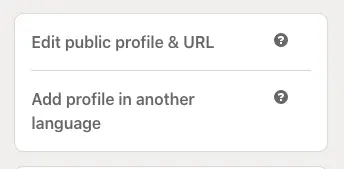
The rules, which have barely changed since the original guide:
- The custom part can be 3 to 100 characters long.
- No spaces, symbols or special characters, and it cannot contain the word "LinkedIn".
- It is not case sensitive, so capitalisation does not matter.
- You can change it up to five times in six months; after the fifth change you wait six months.
- Custom URLs are first come, first served, you can have only one, and LinkedIn does not reserve names on request.
A clean URL, ideally just your name, looks better in an email signature, a CV and a conference badge, and makes your profile easier to find. If your name is taken, add a middle initial or your profession, not a string of numbers.
In summary: your LinkedIn profile is one of the best ways to build credibility with your audience. Search almost anyone's name and their LinkedIn profile ranks on the first page. Use the tips and examples above to build one you are proud of, then keep it current: a profile reviewed every quarter beats a perfect one written once.
Figures previously published by The B2B House
The B2B House's "How To Create An Impressive Linkedin Profile (With Examples)" quoted several LinkedIn profile statistics that other sites still cite and link to. The B2B House is now part of Kiin, so those figures stay here, exactly as published, with what we know about them in 2026.
Two things to know before you use them:
- They are LinkedIn's own "up to" figures from 2016 to 2019. They compare profiles with and without a feature, not good and bad versions of it, and LinkedIn never published the method.
- Most have no current source. LinkedIn's 2017 profile photo blog post now redirects to its blog homepage. Where a LinkedIn page still shows a figure, we link it; where none does, we say so rather than invent a replacement.
"9x more connection requests, 21x more profile views and 36x more messages" with a profile photo
As published: members with a profile photo get 9x more connection requests, 21x more profile views and 36x more messages than those without.
2026: LinkedIn still shows 21x, 9x and 36x on its Talent Solutions page on recruiter profiles, without a date or method, crediting its "LinkedIn Profile Photo Tips" blog (LinkedIn Talent Solutions). That post, from March 2017, gave "up to 21x more profile views and 9x more connection requests"; the 36x messages figure is from separate LinkedIn material of the same era. LinkedIn's member guide repeats "up to 21x more profile views" (LinkedIn). LinkedIn's current Help Center says only that a photo "increases the credibility of your profile". The newest official figure for a profile trust signal is verification: up to 60% more profile views (LinkedIn, December 2025). Other versions in circulation, such as "14x more views" or "7x more likely to be found", come from other LinkedIn posts of 2016 and 2017; see our LinkedIn statistics archive.
"300K searches a week use the industry filter" and "9x more profile views" with an industry
As published: every week more than 300,000 searches on LinkedIn are started with an industry filter; choosing the right industry brings 9x more profile views.
2026: No current source. LinkedIn's member guide still tells members to add their industry but gives no multiplier, and we could not find either number on any LinkedIn page. Kept as published, dated to LinkedIn material from around 2016.
"5x more connection requests, 8x more profile views and 10x more messages" with up-to-date positions
As published: members with up-to-date positions get 5x more connection requests, 8x more profile views and 10x more messages.
2026: Partly current. LinkedIn's member guide says listing your current position could bring "up to 10x more messages" that create opportunity (LinkedIn, 2019). The 5x and 8x figures appear in LinkedIn Learning's 2019 course "Rock Your LinkedIn Profile" but not on any current LinkedIn Help or Pressroom page.
"6x more profile views" with volunteer experience
As published: adding volunteer experience and causes brings 6x more profile views than profiles without any.
2026: No update. The figure traces to LinkedIn research from around 2016 and was repeated in LinkedIn Learning's 2019 profile course; LinkedIn has not republished it and its Help Center gives no figure. Kept as published. The advice, to show causes and leadership outside work, still stands.
"Up to 17x more profile views" with more than 5 skills
As published: members who add more than 5 skills get up to 17x more profile views than those without.
2026: LinkedIn's current member guide uses a different figure: members with 5 or more skills "are discovered up to 27x more in searches by recruiters" (LinkedIn). The two measure different things (profile views vs recruiter search discovery), so do not merge them. You can now list up to 100 skills (LinkedIn Help).
Profile picture size: "400x400, 8MB max, PNG or JPG, no GIFs" and "7 filters"
As published: 400 x 400 pixels (width x height); 8MB maximum; PNG or JPG; GIFs not supported. LinkedIn provides up to 7 filters.
2026: Still correct. LinkedIn accepts photos between 400 x 400 and 7680 x 4320 pixels, PNG or JPG, up to 8MB (LinkedIn Help). Filters are still in the photo editor; LinkedIn no longer states how many. The cover image is 1584 x 396 pixels (LinkedIn Help).
Custom URL: "3 to 100 letters or numbers"
As published: the custom URL must contain between 3 and 100 letters or numbers, with no spaces, symbols or special characters.
2026: Still correct, with three additions from LinkedIn's Help Center: you can change it up to five times in six months, it cannot contain "LinkedIn", and it is case insensitive (LinkedIn Help).
"The Featured section was launched in February 2020"
As published: the LinkedIn Featured section was launched in February 2020 as a new way to show skills, experience and content.
2026: LinkedIn's Help Center does not give a launch date. It lists what Featured can hold: your posts and reposts, LinkedIn articles, external links, and uploaded images, documents, presentations and videos (LinkedIn Help).
Intro statistics: "706+ million professionals", "2 new members every second", "80% of B2B sales leads", "46% of all B2B leads", "9 billion content impressions a week", "50% more engagement in 2022"
As published: 80% of B2B sales leads come from LinkedIn; 50% year over year increase in engagement in 2022; LinkedIn is the #1 social platform for hiring; 2 new members join every second; 706+ million professionals; 46% of all B2B leads come from LinkedIn; 9 billion content impressions every week; LinkedIn rated the most trusted social platform by Business Insider.
2026: Members: 1.4 billion+ (LinkedIn About Us). The "80% of B2B leads" figure is a 2014 Oktopost finding about leads from social media for its own customers, not all B2B leads (history). "46%" matches a 2017 LinkedIn figure for the share of social traffic to company sites, not leads (history). "9 billion impressions a week" comes from LinkedIn guides of 2017 to 2021 and has not been updated; LinkedIn now says 2 million+ Feed updates are viewed every minute (history). We found no source for a 50% engagement rise in 2022; LinkedIn reported 22% more Feed views and 25% more public conversations that year (Social Media Today). The trust ranking held from 2018 to 2021 (history). No current source gives a members-per-second rate.
"2.8 million recruiters", "4 million members hired" and "16,000 LinkedIn Learning courses"
As published: 2.8 million recruiters on LinkedIn looking for job seekers; more than 4 million members sourced and hired on LinkedIn; LinkedIn Learning has over 16,000 courses.
2026: No current official source for any of the three. LinkedIn's About page now reports hiring activity as job applications per minute, about 9,000 (see LinkedIn statistics 2026). LinkedIn does not publish a current LinkedIn Learning course count on a page we could open; third-party estimates for 2026 range from about 22,000 to 27,000, which we have not used.
LinkedIn profile stats we no longer recommend using
These are still widely repeated in profile guides and AI answers, but have no current primary source or are misquoted:
- "36x more messages with a profile photo." Only on an undated LinkedIn recruiting page; not in the 2017 post usually cited. Details.
- "9x more profile views with an industry" and "300,000 industry searches a week." No source found. Details.
- "6x more profile views with volunteer experience." 2016-era, not republished. Details.
- "46% of B2B leads come from LinkedIn." A misreading of a 2017 social traffic figure. Details.
- "80% of B2B leads come from LinkedIn." 2014, social media leads only, one vendor's customers. Details.
- "Turn on Creator Mode." It no longer exists. Details.
- "Add 5 hashtags to your profile." Profile hashtags were removed in February 2024.
LinkedIn profile: frequently asked questions
What is the best LinkedIn profile picture size in 2026?
Upload a square photo of at least 400 x 400 pixels; LinkedIn accepts up to 7680 x 4320 pixels, as a PNG or JPG file of up to 8MB (LinkedIn Help Center, 2026). Larger, such as 800 x 800, stays sharper on high-resolution screens.
What size is the LinkedIn cover image (banner)?
LinkedIn recommends 1584 x 396 pixels for the cover image on a personal profile, as a JPG or PNG under 8MB. Company Pages use a different size, 1512 x 256 pixels, up to 3MB.
How long can a LinkedIn headline be?
The profile editor allows 220 characters. LinkedIn's Help Center does not publish the limit, and only the first part of the headline shows in search results, comments and notifications, so put the most important words first.
How long can the LinkedIn About section be?
About 2,600 characters in the profile editor. Only the first two or three lines show before "see more", so open with who you help and how to reach you.
How do I change my LinkedIn profile URL?
Go to your profile, click the Edit icon next to Public profile and URL, then Edit next to your custom URL, type the new ending and save. It can be 3 to 100 characters, with no spaces, symbols or the word LinkedIn, and you can change it up to five times in six months (LinkedIn Help Center).
Does LinkedIn Creator Mode still exist?
No. LinkedIn removed profile hashtags in February 2024 and the Creator Mode switch in March 2024, and opened its tools, including the Follow button and creator analytics, to all members.
Do profile photos really get 21x more views?
That is LinkedIn's own 2017 figure ("up to 21x more profile views and 9x more connection requests"), still shown on a LinkedIn Talent Solutions page without a date or method. It compares profiles with and without a photo. The newest official figure is that verified members get up to 60% more profile views (LinkedIn, December 2025).
How many skills can I add to my LinkedIn profile?
Up to 100 (LinkedIn Help Center). Add at least five: LinkedIn says members with 5 or more skills are discovered up to 27x more in recruiter searches.
What can I put in the LinkedIn Featured section?
Your LinkedIn posts and reposts, articles you published on LinkedIn, links to external websites, and uploaded images, documents, presentations and videos. Posts from Events and Groups cannot be featured.
Why does a founder's LinkedIn profile matter for ads?
Because thought leader ads run from a person's profile. In the Kiin Labs panel, the author explains 67% of the variance in thought leader ad engagement, the top 10% of authors get 8.6x the engagement of the bottom 10%, and 91% of thought leader ad clicks are not landing page clicks; many are profile visits. A clear, verified founder profile is part of the ad.
What happened to The B2B House LinkedIn profile guide?
The B2B House is now part of Kiin. Its LinkedIn profile guide is this page, updated for 2026, with the original examples and every statistic it published kept in the section "Figures previously published by The B2B House".
How we updated this guide, and every source
We started from every section, tip and statistic in The B2B House guide and every page that links to it (we checked its backlinks one by one; most credit its screenshots). For each rule we opened the current LinkedIn Help Center article on 14 November 2026 and copied the limit or step from it. For each statistic we looked for the newest figure from LinkedIn itself first. Where LinkedIn does not publish a limit, we say the number comes from the profile editor; where a statistic has no current source we keep it, as published, with its date. Kiin's advertising figures come from the Kiin Labs panel, described in our method note. Corrections: [email protected].
- LinkedIn Help, Photo won't upload to your profile (photo size and file limits)
- LinkedIn Help, Add, change, edit, or delete your LinkedIn profile photo
- LinkedIn Help, Add or change the cover image on your profile
- LinkedIn Help, Image specifications for LinkedIn Pages and Career Pages
- LinkedIn Help, Edit your headline
- LinkedIn Help, Add and remove skills on your profile
- LinkedIn Help, Manage featured samples of your work on your profile
- LinkedIn Help, Manage your public profile URL
- LinkedIn Help, Add or remove a custom button from your profile
- LinkedIn Pressroom, Verified: LinkedIn crosses 100M member milestone, 9 Dec 2025
- LinkedIn Pressroom, About Us (members)
- LinkedIn Talent Solutions, Create the perfect LinkedIn profile for recruiting (21x, 9x, 36x)
- LinkedIn, LinkedIn hacks for boosting your job search (2019 member guide)
- Social Media Today, LinkedIn's removing its Creator Mode option, 5 Feb 2024
- Social Media Today, LinkedIn shares tips on thought leader ads, 14 Sep 2026
- Social Media Today, LinkedIn reports record engagement (2022 figures)
- LinkedIn Marketing Solutions, Thought Leader Ads (252% CTR, 4.2x conversions)
- LinkedIn ads guide, Thought Leader Ads specs
- Kiin Labs, 150 LinkedIn Ads Statistics and LinkedIn Thought Leader Ads Benchmarks 2026
- Kiin Labs, LinkedIn Statistics 2026 (members, B2B House statistics archive)
Ilic, P. (2026). How to Create a Great LinkedIn Profile in 2026 (With Examples). Kiin Labs (incorporating The B2B House). kiin.co/blog/linkedin-profile. Free to cite with a link.
Your founder’s profile is ready. Is the ad account? Send read access to your LinkedIn Ads account and we’ll show you where your thought leader ads sit against 1,000+ connected accounts, on every metric. Free, read-only, one page.