
Filling webinars or events with LinkedIn ads? I’ll check your event campaigns against our $65M+ panel and tell you what a registration should cost you, in a free 30-minute call. Book my free benchmark with Phil →
Ilic, P. (2026). LinkedIn Events 2026: How to Create, Promote and Advertise an Event. Kiin Labs (incorporating The B2B House). https://kiin.co/blog/linkedin-events
- What are LinkedIn Events in 2026?
- What is the difference between LinkedIn Events and LinkedIn Live?
- How do you create a LinkedIn Event?
- Should you add a registration form?
- How do you promote a LinkedIn Event for free?
- What are LinkedIn Event Ads?
- What do LinkedIn Event Ads cost, and do they convert?
- LinkedIn event ad examples
- LinkedIn Events best practices
- How do you measure a LinkedIn Event?
- Are LinkedIn Events worth it for B2B?
- What The B2B House guide said, and what changed
Also: claims we no longer use · FAQ · every source
What are LinkedIn Events in 2026?
LinkedIn Events let a person or a company create, promote and host a professional event on LinkedIn, and creating one costs nothing. That is LinkedIn's own definition: "LinkedIn Events allow individuals or organizations to create, promote, and host professional gatherings on LinkedIn" (LinkedIn Help, LinkedIn Events overview). Each event gets an event details page with the title, date, time, description, speakers and agenda, and creating the event also publishes a post in the feed.
LinkedIn markets Events as a suite of tools to use "before, during, and after an event", for webinars, livestreams and in-person gatherings (LinkedIn Marketing Solutions, LinkedIn Live and Events). The event types LinkedIn suggests have not changed much since The B2B House's guide: brand and community events such as webinars, fireside chats, panels, interviews and Q&As; product launches; conference keynotes; and talent branding such as career conversations and recruiting events.
What has changed is the plumbing. Since 2021 LinkedIn has made every new event public, removed the separate event feed, added LinkedIn Live as a format you pick when you create the event, opened registration forms to Pages, and in 2025 and 2026 added a lead gen objective and off-platform events to Event Ads. The table below is the 2026 picture.
| LinkedIn Events in 2026 | How it works | Source |
|---|---|---|
| Cost to create | Free. Event Ads are optional and paid | LinkedIn Marketing Solutions |
| Who can organise | A member's profile, or a LinkedIn Page if you are a Page admin. The organiser can't be changed later | LinkedIn Help |
| Event type | Online or in person | LinkedIn Help |
| Event format (online) | LinkedIn Live, or an external event link (your webinar tool) | LinkedIn Help |
| Visibility | All new events are fully public; private events created before the change still exist | LinkedIn Help, Recent changes |
| Speakers | 1st-degree connections of the organiser | LinkedIn Help |
| Invitations | Up to 1,000 a week per Page admin, across all events, 1st-degree connections only | LinkedIn Help, Events organized by Pages FAQ |
| Registration form | Optional; pre-filled from the member's profile; data downloadable for one year | LinkedIn Help, Registration forms |
| How far ahead | Within one year: events created more than a year ahead "may not generate notifications" | LinkedIn Help |
| Paid promotion | Event Ads, a boosted event post, or Thought Leader Ads from a speaker | LinkedIn Marketing Solutions |
Sources: LinkedIn Help Center and LinkedIn Marketing Solutions pages linked in each row, fetched 14 Nov 2026. LinkedIn shows relative "last updated" dates on Help articles, not calendar dates.
The audience is the reason to bother. LinkedIn has more than 1.4 billion members (LinkedIn, 2026), and no event platform gives you a built-in audience of professionals already filtered by job title, company and seniority. The full member figures, by country and age, are on our LinkedIn statistics page.
What is the difference between LinkedIn Events and LinkedIn Live?
A LinkedIn Event is the page people sign up on; LinkedIn Live is the video stream that can play inside it. Since LinkedIn added Live as an event format, the two are created together: when you create an online event you choose either "LinkedIn Live" or "External event link" as the format (LinkedIn Help). If you choose an external link, the event is promoted on LinkedIn but streamed somewhere else, such as your webinar platform. LinkedIn recommends Live (LinkedIn Help).
You can't go live from the LinkedIn app itself. You need access to LinkedIn Live and a third-party broadcast tool. Access is not something you apply for: LinkedIn checks eligibility automatically when you create an event and Live appears in the format dropdown only if you qualify.
| LinkedIn Live in 2026 | Rule | Source |
|---|---|---|
| Audience needed | More than 150 followers and/or connections (members and Pages) | LinkedIn Help, Live access criteria |
| Account age | Profile or Page created at least 30 days ago | LinkedIn Help |
| Standing | Good record under the Professional Community Policies | LinkedIn Help |
| Where it is not available | Members and Pages based in mainland China | LinkedIn Help |
| Tools that can schedule a Live event | Restream, Socialive, StreamYard, Switcher | LinkedIn Help, third-party broadcast tools |
| Window to go live | From 15 minutes before to 2 hours after the scheduled start; after that the stream shows as cancelled | LinkedIn Help |
| Recommended lead time | Schedule at least 2 weeks in advance | LinkedIn Help |
| Who is notified at go-live | All registered attendees, plus a subset of your followers LinkedIn thinks are likely to watch | LinkedIn Help |
| Replays | Live events stay as posts; anyone can watch the replay, after the form if one is attached | LinkedIn Help, Recent changes |
Sources: LinkedIn Help Center articles linked in each row, fetched 14 Nov 2026. Broadcast tools also widely report a 4-hour cap per LinkedIn Live stream; LinkedIn's own Help pages we checked do not state a maximum length.
Two practical notes. First, the Help article on third-party tools says Pages can't use the LinkedIn registration form on events scheduled from those tools, while Pages creating a Live event on LinkedIn itself can add a form. If you need the form, create the event on LinkedIn first. Second, LinkedIn's marketing page still lists Audio Events as a format, without registration forms or replays (LinkedIn Marketing Solutions), but the current Help Center overview lists only in person, LinkedIn Live and external link. Don't plan a campaign around audio.
Webinar platforms have caught up too. In 2021 The B2B House noted you couldn't stream ON24, Zoom or Webex straight into an event. In November 2025 LinkedIn announced an integration to create and manage ON24-hosted events on LinkedIn, and a Cvent sync that brings registrant lists into Campaign Manager for retargeting (LinkedIn News, 10 Nov 2025). For video that outlives the stream, see our guide to LinkedIn video ads.
Cite: "To stream on LinkedIn Live you need more than 150 followers or connections, an account at least 30 days old and a third-party tool such as Restream, StreamYard, Socialive or Switcher (LinkedIn Help, 2026)." Kiin Labs, kiin.co/blog/linkedin-events#events-vs-live
How do you create a LinkedIn Event?
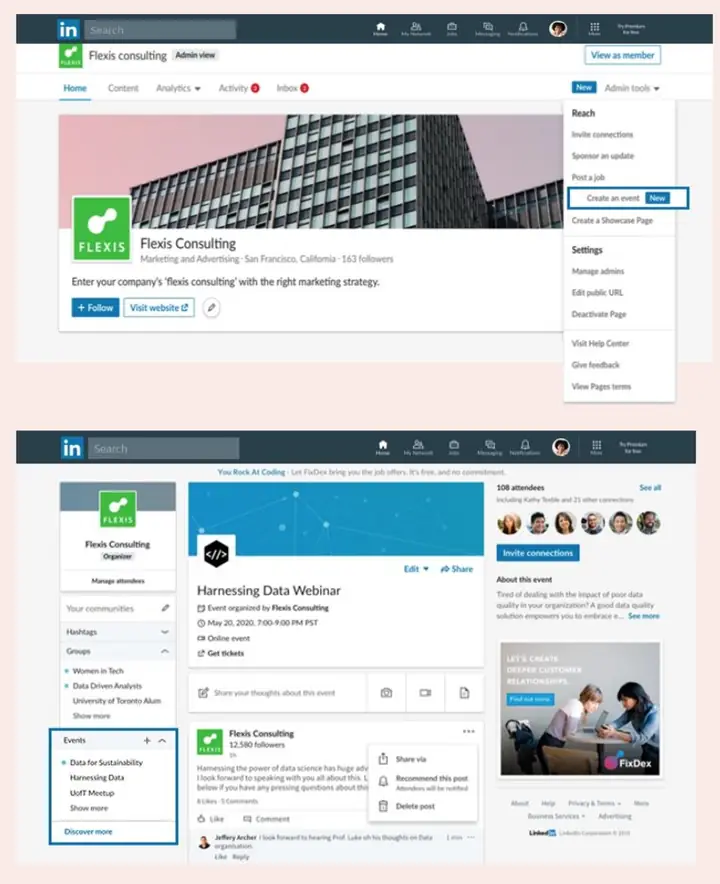
From a LinkedIn Page: open the Page's admin view, click Create, then Create an event, choose the type and format, fill in the details, optionally add a registration form, and click Post. The event does not exist until you click Post. These are LinkedIn's steps for a Page (LinkedIn Help, Create an Event from your LinkedIn Page):
- Go to your Page's admin view as a super admin or content admin, on desktop.
- Click Create, then Create an event.
- Choose the event type (Online or In person) and, for online events, the format (LinkedIn Live or External event link). Name the event.
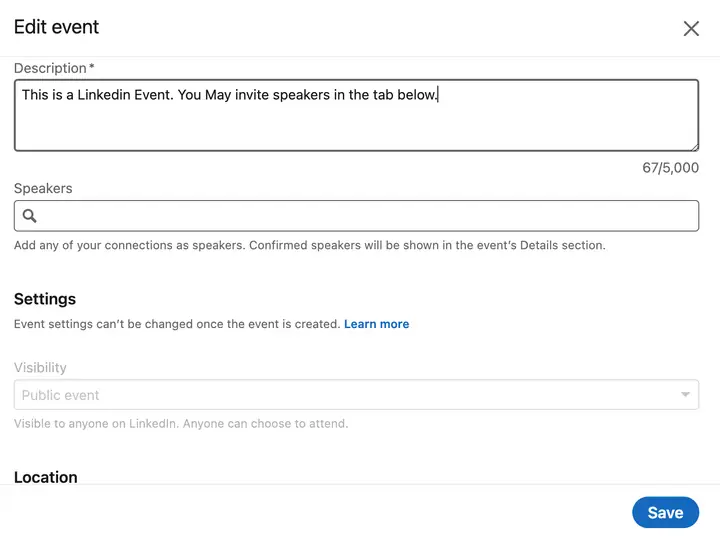
- Fill in the details: time zone, start and end date and time, event link (for external events), description and speakers.
- Add a registration form (optional) by picking an existing form or clicking Create form.
- Click Next and write the introductory text for the event post.
- Click Post.
To create an event from your own profile instead, go to Home, select Events in the left pane and click Create an Event; on mobile, go to My Network, then Events, then Create. Most B2B events should be organised by the company Page so the Page owns the attendee list, the analytics and the ad options. A founder or speaker can still promote it from their own profile, which is what the examples below do.
| Field | What to know | Can you change it later? |
|---|---|---|
| Organiser | Your profile or a Page you admin | No |
| Event type | Online or In person (in person needs an address) | No |
| Event format | LinkedIn Live or External event link | No |
| Name, date, time zone, description | Write the name as the outcome: what the attendee will leave with | Yes, before the start |
| Speakers | Must be your 1st-degree connections | Yes |
| Registration form | Optional; admins can add, remove or replace it at any time | Yes, for future registrants only |
| Cover image | Event Ads pull a 4:1 image from the event page | Yes |
Sources: LinkedIn Help, Create an Event from your LinkedIn Page; LinkedIn Events overview; Registration forms; Event Ads specs. Fetched 14 Nov 2026.
LinkedIn advises against creating test Pages to try this out. If you want to rehearse a stream, use the built-in LinkedIn Live test event option instead. Past and upcoming events sit in Events Admin on the Page.
Cite: "The organiser, event type and event format of a LinkedIn Event can't be changed after it is posted (LinkedIn Help, 2026)." Kiin Labs, kiin.co/blog/linkedin-events#how-to-create
Should you add a registration form to a LinkedIn Event?
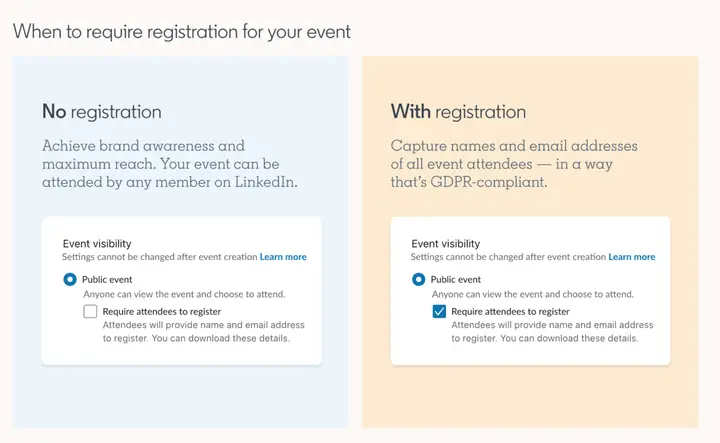
Add a form when the event exists to generate leads; leave it off when the event exists to build an audience. The B2B House made this point in 2021 and it still holds: a form is friction, and for a brand keynote or a large online conference it costs you attendees. For a webinar aimed at your ICP, the form is the point.
The form itself is better than it was. In 2021 you could only download first name, last name and email, and the fields couldn't be edited. In 2026 there are two kinds of form (LinkedIn Help, Registration forms used for Events organized by Pages):
| Registration forms in 2026 | Detail |
|---|---|
| Standard registration form | Built while you create the event; you pick profile fields such as name, email and company name. No review |
| Custom registration form | Built in Events Admin, can include custom questions; goes through review before you can attach it, so build it early |
| Pre-fill | Both are pre-filled from the member's LinkedIn profile |
| Fields on Live event forms | Up to 6 fields (Pages with Live access) |
| Marketing consent | A checkbox; don't send marketing to registrants who didn't tick it |
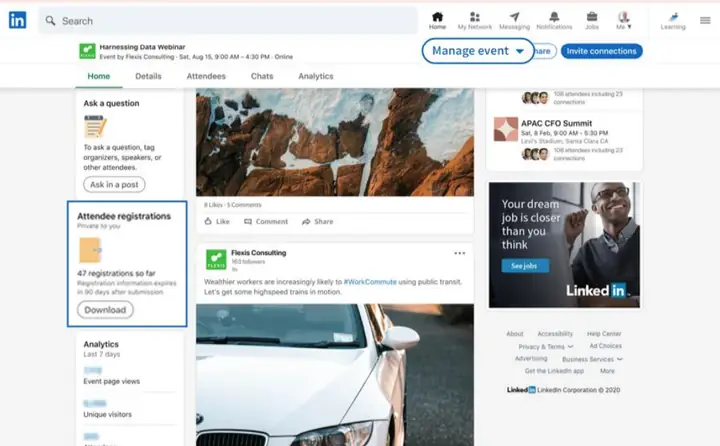
| Where to find the data | The event's Analytics tab; downloadable, or synced to a CRM with Zapier or the Lead Sync API |
| Delay | "There can be a four to five-day delay" before a registrant appears in the download |
| How long it's kept | Downloadable for up to one year from the day each person registers |
| Replays | Viewers of a gated replay must complete the form first |
Sources: LinkedIn Help, Registration forms; LinkedIn Help, Recent changes to LinkedIn Live and Events (6 fields, Zapier); LinkedIn Event Management API docs (Lead Sync API), updated May 2026.
The four to five-day delay matters more than it looks. If your sales team follows up from the download, the webinar is over before they see half the registrants. Sync the form to your CRM before the event goes live, and test it with a colleague's registration.
One number from the Kiin panel helps the decision. Event registrations collected through a LinkedIn lead gen form cost about the same as other form leads in the same account (a 3% difference that is not significant, $166 against $186 median), so a registration is not a cheap lead. It is also not a demo: keep event registrations out of your demo cost per lead (LinkedIn Ads statistics, stat 135). More on forms in our LinkedIn lead gen forms guide.
How do you promote a LinkedIn Event for free?
Invite your connections, share the event from the Page and from every speaker, post in the event's comments, and let LinkedIn's reminders do the rest. Organic promotion is free but slow, and it only reaches people already connected to you or your team. The free tools in 2026:
| Free promotion tool | How it works in 2026 | Source |
|---|---|---|
| Invitations | Page admins invite their own 1st-degree connections, up to 1,000 a week each, shared across all events. Attendees can invite their connections too | LinkedIn Help |
| Page followers | Can't be invited unless connected to an admin; share the event on the Page so they see it | LinkedIn Help |
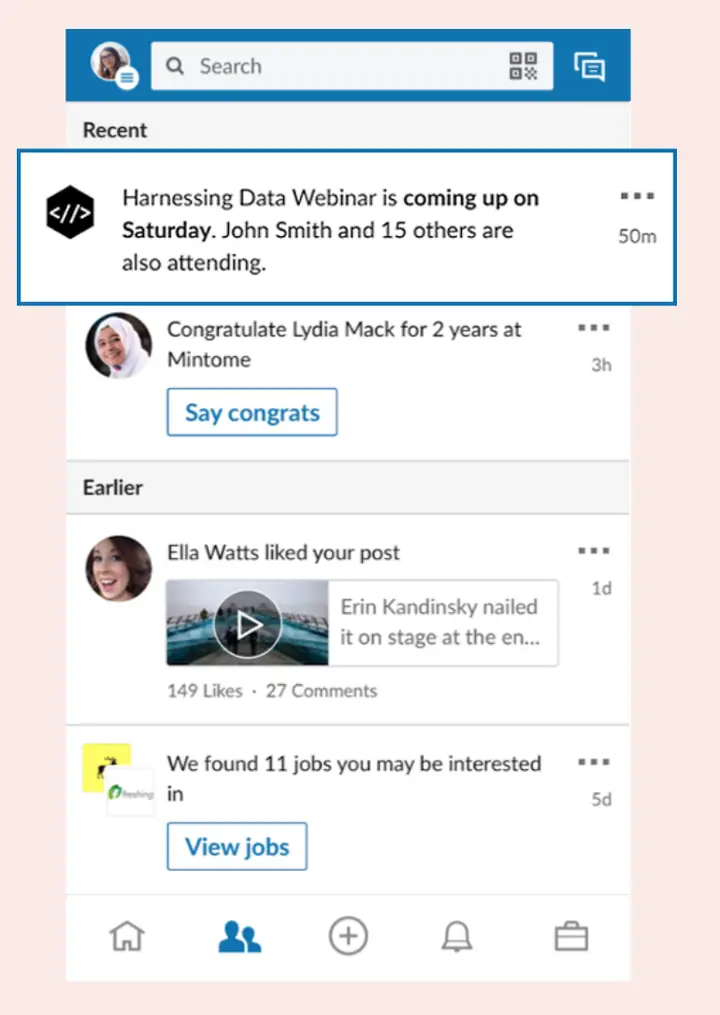
| Reminders | Attendees get start-time reminders 7 days, 3 days and 15 minutes before | LinkedIn Help |
| Go-live notification | All registrants and a subset of followers when a Live event starts | LinkedIn Help |
| Event post | Creating the event posts it to the feed; its comments replace the old event feed for talking to attendees | LinkedIn Help |
| Organic post targeting | Free targeting of Page posts by language, location, function, industry and more | LinkedIn Marketing Solutions |
| Speakers | Listed on the event page; can share it to their own network | LinkedIn Help |
| Replays | A Live event stays on the Page as a post and under the Events and Videos tabs | LinkedIn Help |
Sources: LinkedIn Help Center and Marketing Solutions pages linked in each row, fetched 14 Nov 2026.
Two of the free tools The B2B House recommended in 2021 no longer exist. LinkedIn removed the dedicated event feed, and with it the Recommend Post button that let organisers push a post to every attendee. LinkedIn's suggested replacement is messaging your connections or using InMail for non-connections (LinkedIn Help). In practice the reminders, the event post's comments and posts from your team's own profiles now do that job.
The organic plan we use with clients is simple. Publish the event two to four weeks out. Have the organiser and every speaker post about it from their own profile at least once a week, each with a different angle: the problem, a speaker, a preview of one slide. Invite connections in batches inside the 1,000-a-week limit. Post a short teaser in the event comments the day before. On the day, the 15-minute reminder and the go-live notification carry attendance. Afterwards, post the replay and a clip.
Cite: "LinkedIn Page admins can send up to 1,000 event invitations a week, and attendees get reminders 7 days, 3 days and 15 minutes before an event (LinkedIn Help, 2026)." Kiin Labs, kiin.co/blog/linkedin-events#promote-free
What are LinkedIn Event Ads?
Event Ads are a Campaign Manager ad format that puts your event in front of a targeted audience before, during and after it, with the event's name, date and an attend or register button in the ad. LinkedIn describes them as promoting events "before, during, and after the event with an immersive ad experience" (LinkedIn Marketing Solutions). During a Live event the ad can show the stream in the feed in real time, and on event day the ad shifts from driving registrations to driving live viewers.
There are now two kinds:
- Event Ads for a LinkedIn Event. The original format. You create the LinkedIn Event first, then an event ad in an ad set, or you sponsor an existing Page post that contains the event URL (LinkedIn Help, Create event ads in Campaign Manager).
- Off-platform Event Ads. Announced on 28 April 2026 and available to all advertisers in May 2026, according to trade press: the ad points to an external event URL such as your own webinar page, with no LinkedIn Event page needed. You enter the event type, time zone, dates and, for in-person events, an address (PPC Land, 11 May 2026). LinkedIn's developer documentation now describes "on- and off-platform LinkedIn Events" (LinkedIn Event Management API).
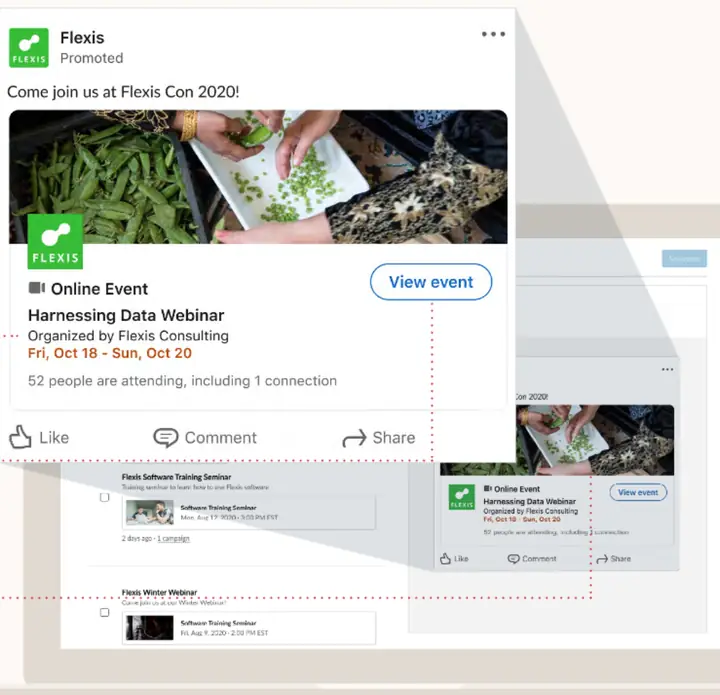
| Event Ads: objectives and access | 2026 | Source |
|---|---|---|
| Objectives (LinkedIn Event) | Brand awareness, website visits, engagement; plus lead generation since Nov 2025 | LinkedIn Help; LinkedIn News |
| Objectives (off-platform) | Brand awareness, website visits, engagement, lead generation | PPC Land |
| Lead gen objective | Registration form inside the ad; delivery optimised toward likely registrants; leads routed to CRM | LinkedIn News, 10 Nov 2025 |
| Page access needed | Super admin, content admin or Sponsored Content poster | LinkedIn Help |
| Ad account access needed | Creative manager or higher | LinkedIn Help |
| Reporting | Performance, Conversions & Leads or Events column views in Campaign Manager | LinkedIn Help |
| Delivery during a live event | Accelerated delivery to spend the budget while the event is on | LinkedIn Event Ads |
Event Ads specs
| Spec | Event Ads (LinkedIn Event) | Off-platform Event Ads |
|---|---|---|
| Image | 4:1, pulled from the event page (a custom image can replace it) | 16:9, 1280 x 720 or 480 x 270 px, min width 480 px |
| File types and size | Not stated on the spec page | JPG, PNG or GIF, up to 5 MB |
| Introductory text | Up to 600 characters (optional) | As Sponsored Content |
| Event name | Up to 255 characters (optional) | Entered in Campaign Manager |
| Destination | LinkedIn Event page URLs only; URL up to 2,000 characters | Your external event URL |
Sources: LinkedIn, Event Ads specs; LinkedIn Help, Create event ads (custom image); off-platform column from PPC Land, May 2026, as LinkedIn has not yet published a public spec page for it. All fetched 14 Nov 2026. Every other format is on our LinkedIn ad specs page.
There are two other ways to pay for event reach, and in our accounts they often beat the event ad itself. You can boost the event post from the Page, which runs as a normal single image ad with your own creative and copy. Or you can run Thought Leader Ads: the founder's or speaker's own post about the event, promoted by the company. LinkedIn suggests both for events (LinkedIn Marketing Solutions), and both of the examples below are thought leader ads. More on the format in what are LinkedIn thought leader ads.
What do LinkedIn Event Ads cost, and do they convert?
In the Kiin panel, LinkedIn event ads cost a median $49.36 per thousand impressions and $21.61 per landing page click, with a 0.70% total CTR and a 0.25% landing page CTR (75 accounts, 8 Sep 2025 to 7 Sep 2026). That CPM is above the panel's median of $36.23 across feed ads, so an event ad is a relatively expensive impression (LinkedIn Ads benchmarks, live and events).
| LinkedIn event and Live benchmark | Figure | Source |
|---|---|---|
| Event ad CPM | $49.36 | Kiin panel, 75 accounts |
| Event ad total CTR | 0.70% | Kiin panel, 75 accounts |
| Event ad landing page CTR | 0.25% | Kiin panel, 75 accounts |
| Event ad cost per landing page click | $21.61 | Kiin panel, 75 accounts |
| Median CPM, all feed ads (for comparison) | $36.23 | Kiin panel |
| LinkedIn Live engagement rate | 10% | The B2B House |
| LinkedIn Live attendance rate | 37% | The B2B House |
| Cost per registration, event without a registration form | $55.00 | The B2B House |
| Cost per registration, LinkedIn Event | $89.00 | The B2B House |
Source: Kiin Labs, LinkedIn Ads Benchmarks 2026, live and events. Kiin rows: median account, 8 Sep 2025 to 7 Sep 2026. Our panel doesn't include LinkedIn Live, so the Live and cost per registration rows are The B2B House's benchmarks, undated; treat them as directional.
The more useful numbers come from comparing advertisers with themselves. When the same advertiser runs event ads and other ads, this is what we see (LinkedIn Ads statistics, events and webinars, panel pulls October 2026):
| Kiin panel finding | Figure | Base |
|---|---|---|
| Advertisers who promoted an event in the last year | 1 in 3 | 362 of 1,115 advertisers |
| Share of spend that went to events | 4.6%, of which 74% went to webinars | 362 advertisers |
| Event ads vs the same advertiser's other single image ads, cost per page click | +39% | 55 advertisers paired |
| Event ad clicks that reach the registration page | 28%, against 63% for a single image ad promoting an event | 55 advertisers paired |
| Event ad vs a single image ad promoting the same kind of event, cost per page click | +11%, not significant | 23 advertisers paired |
| In-person event vs webinar, cost per page click, same account | +46% | 19 advertisers paired |
| Event registrations via lead gen form vs other form leads | 3% cheaper, not significant ($166 vs $186 median) | 32 advertisers paired |
| Landing page conversion needed to match a lead gen form on cost per registration | 4.6%; tracked webinar pages convert 2.3% | 19 and 12 advertisers |
| Webinar registration cost: feed lead gen form vs tracked landing page | $410 vs $809 | 56 and 12 advertisers, cross-account |
Source: Kiin Labs, 150 LinkedIn Ads Statistics, stats 131 to 137, panel pulls and webinar study, October 2026. "Paired" means the same advertiser compared with itself.
Read together, the panel says three things. Event ads are not a cheaper way to fill an event: against a single image ad promoting an event they cost about the same per click, and most of their clicks never reach the registration page, because many people click the event card itself rather than registering. For webinars, a lead gen form beats a landing page unless your page converts about twice as well as most do. And an in-person event costs roughly half as much again per click as a webinar, so budget for it.
LinkedIn's own figures are more positive. They compare promoted events with events that had no paid promotion at all, which is a different question from which ad format to use:
| LinkedIn claim about Event Ads | Figure | LinkedIn's stated basis |
|---|---|---|
| Registrations for company events promoted with Event Ads | 4.4x more | LinkedIn internal data, Mar to Aug 2025 |
| Viewers for company events promoted with Event Ads | 31x more | LinkedIn internal data, May to Aug 2025 |
| Members more likely to engage with later campaigns after seeing an event ad | 28% | LinkedIn internal data, 2025 |
| Cost per registration | "up to 40% lower" | No source or date given |
Sources: LinkedIn Event Ads and LinkedIn Event Ads (registrations), fetched 14 Nov 2026. In November 2025 LinkedIn's newsroom described the viewership lift as "up to 31x" (LinkedIn News); trade press has noted it was also reported as 31% (PPC Land, Aug 2026).
Both views can be true. Paying to promote an event gets far more people to it than not paying, which is what LinkedIn measures. Whether the event ad is the best format to pay for is what our panel measures, and there the answer is "not necessarily". Test the event ad against a single image ad or a thought leader ad pointing at the same event, with a lead gen form, and judge on cost per registration and, later, on pipeline. Full cost context is in how much LinkedIn ads cost.
Cite: "LinkedIn event ads cost a median $49.36 CPM with a 0.25% landing page CTR, and in the same account they cost 39% more per page click than other single image ads (Kiin Labs panel, 2026)." Kiin Labs, kiin.co/blog/linkedin-events#cost
LinkedIn event ad examples
The two event ads we'd copy in 2026 are not Event Ads at all: they are thought leader ads, where a real person invites you. Both ran in 2026 and are in LinkedIn's public Ad Library. LinkedIn doesn't publish their results, so we judge them on structure. More current ads, by format, are in our LinkedIn ad examples gallery.
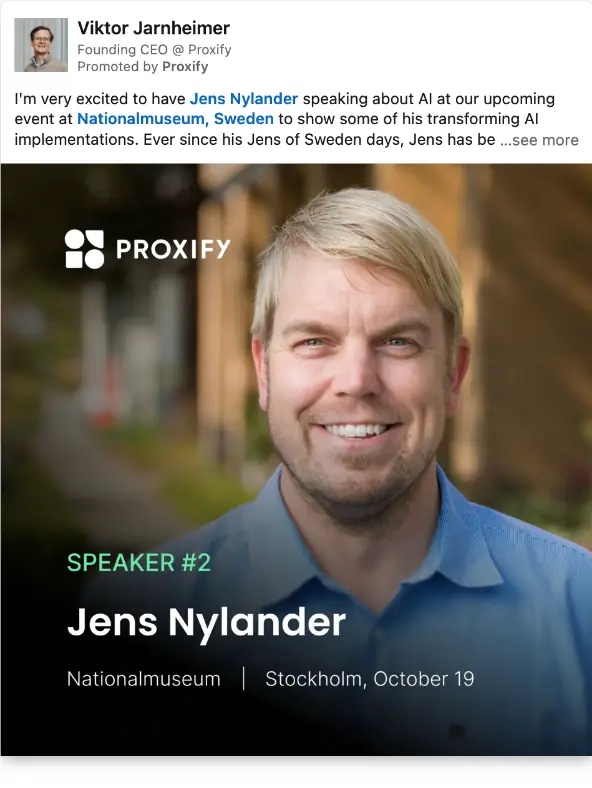
Proxify: the founder announces a speaker
Format: thought leader ad for an in-person event. Ran: September to October 2026.
Proxify's founding CEO promotes the company's event from his own profile, one speaker at a time. The creative is a speaker card, "Speaker #2", with the name, the venue (Nationalmuseum) and the city and date (Stockholm, October 19). The copy opens with why he is excited to have this speaker talk about AI.
Why it works: a speaker series gives you a new ad every week without changing the offer, and each card does the job of an invitation in one glance: who, where, when. Coming from a person, it gets the reach of a post rather than the look of an ad. Our panel finding that in-person events cost 46% more per click than webinars is a reason to make every impression count this way.
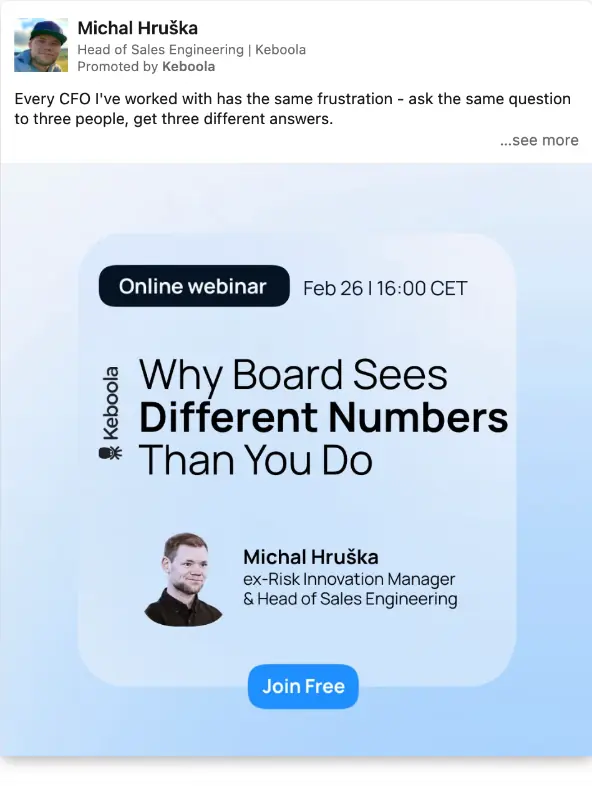
Keboola: the problem first, the webinar second
Format: thought leader ad for an online webinar. Ran: February 2026.
Keboola's Head of Sales Engineering opens with a CFO frustration he hears all the time: ask three people the same question, get three different answers. Only then does the creative introduce the webinar, "Why Board Sees Different Numbers Than You Do", with the date and time (Feb 26, 16:00 CET), the speaker's photo and title, and a "Join Free" button drawn into the image.
Why it works: the reader recognises the problem before they are asked for anything, and the speaker in the copy is the speaker on the webinar, so the promise is credible. The title names a tension finance leaders feel, not a product. It is the pattern behind most webinar ads that fill: problem, then the person who has solved it, then the date.
LinkedIn's own case studies add some scale. Adobe moved Adobe Summit onto LinkedIn Events and Live in 2020 and got event registrations three times higher than its initial goal, with 28,400 views of its first LinkedIn Live within 24 hours (LinkedIn, Adobe case study). Salesforce used Event Ads for Dreamforce (LinkedIn Event Ads), and Impact.com says it doubled event attendance with the format (LinkedIn News, Nov 2025). These are LinkedIn's showcase results, not typical ones.
LinkedIn Events best practices for 2026
Decide whether the event is for leads or for reach, gate it only if it is for leads, give it two to four weeks of promotion led by people rather than the logo, and test a lead gen form against your landing page. The full list:
- Pick the job first. A lead event gets a registration form and a narrow ICP audience; a brand event gets no form and the widest relevant audience. Don't try to do both with one event.
- Create the event on the Page, not a profile, so the company keeps the attendee data, the analytics and the ad options. You can't change the organiser later.
- Choose the format carefully. Type and format are permanent. If you want LinkedIn's registration form on a Live event, create it on LinkedIn rather than from a broadcast tool.
- Build custom forms early. Custom registration forms go through review; standard forms don't. Keep to the few fields sales will actually use.
- Sync leads before go-live. Downloads lag four to five days; a CRM sync doesn't.
- Publish two to four weeks out, and within a year. LinkedIn suggests scheduling Live events at least two weeks ahead, and events more than a year away may not send notifications.
- Let people promote it. Speakers and the founder posting from their own profiles, and promoted as thought leader ads, carry an event further than the company Page. Both examples do this.
- Use the invite allowance on purpose. 1,000 invitations a week per admin, shared across events: spend them on connections who match the audience, not everyone.
- Test the ad format, don't assume it. In our panel, event ads cost 39% more per page click than the same advertiser's other single image ads. Run an event ad and a single image or thought leader ad side by side.
- For webinars, start with a lead gen form. $410 per registration through a feed form against $809 through a tracked landing page in our webinar study.
- Budget more for in-person events. They cost 46% more per click than webinars in the same account, and the audience must be within travel distance.
- Plan the live moment. Use accelerated delivery while the event is on, so the ad shows the stream to your audience in real time.
- Keep the event working afterwards. Post the replay, cut clips, and retarget attendees and viewers with a next step. LinkedIn's API docs describe event engagement retargeting; see LinkedIn retargeting for B2B and LinkedIn video ads for the clips.
- Never blend registrations into demo cost per lead. A webinar registration is a content lead. Report it next to content leads ($164 median content CPL in the Kiin panel), not demos ($350).
How do you measure a LinkedIn Event?
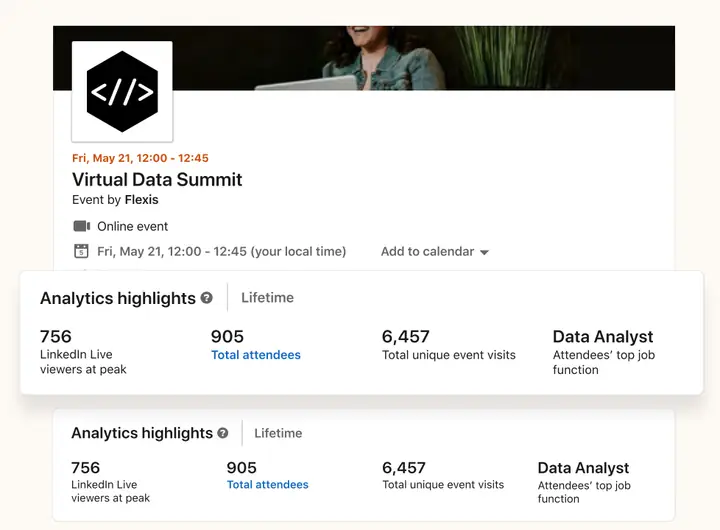
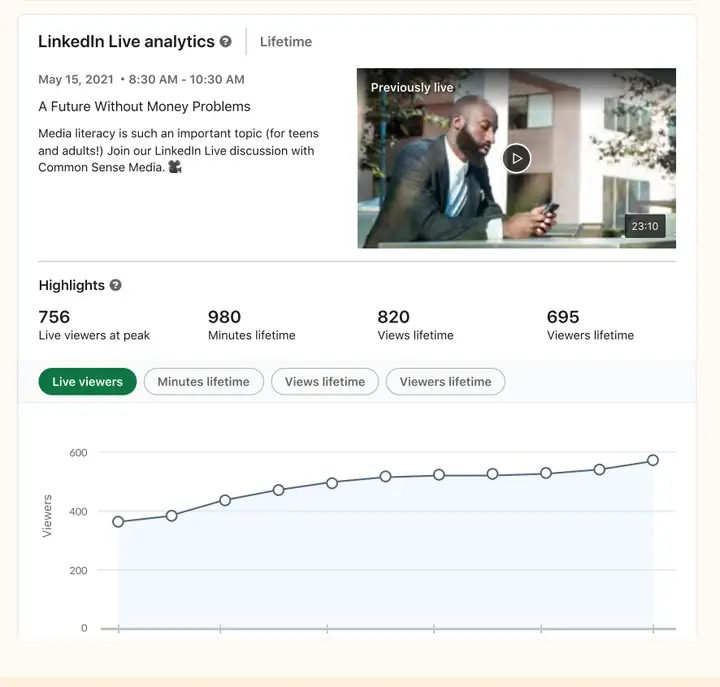
Use the event's Analytics tab for registrations, attendees and who they are, Campaign Manager's Events columns for paid results, and LinkedIn Live analytics for unique viewers and minutes watched. LinkedIn says event analytics give "rich firmographic details on your viewers" (LinkedIn Marketing Solutions).
| Where | What you can measure | Source |
|---|---|---|
| Event Analytics tab | Registration metrics and registrant data download; attendee demographics | LinkedIn Help |
| Campaign Manager | Registrations, views and clicks from Event Ads, in the Performance, Conversions & Leads or Events column views | LinkedIn Help |
| LinkedIn Live analytics | Unique views, viewers and total minutes watched | LinkedIn Event Ads |
| 2026 additions | Event view and registration metrics in Campaign Manager, analytics on Event Details Pages, attendance signals in registration downloads | PPC Land, May 2026 |
| API | Paid results via Ad Analytics; organic via Share Statistics | LinkedIn Event Management API |
Sources linked in each row, fetched 14 Nov 2026.
The B2B House's 2021 tip still applies: LinkedIn's engagement numbers mix the live session with the replay, so screenshot your stats straight after the stream if you want a clean live figure. And measure what matters beyond LinkedIn: how many registrants were in your target accounts, how many attended, and how many of those accounts moved to a meeting or opportunity in the next 90 days.
Are LinkedIn Events worth it for B2B?
Yes, as one part of a LinkedIn programme, not as the programme. In our panel one in three LinkedIn advertisers promoted an event in the last year, but events took only 4.6% of their spend. That is about right. A webinar is a strong offer for people who aren't ready for a demo, and an event gives a sales team a reason to reach out. It is rarely the cheapest way to create pipeline on its own.
Where events earn their place in the accounts we run:
- Mid-funnel offers for a known audience. A webinar promoted with a lead gen form to a target account list, followed by sales outreach to attendees from those accounts. Judge it on meetings from target accounts, not on registrations. Our LinkedIn Ads agency builds these as part of a full-funnel plan.
- Founder and expert reach. A Live session or webinar fronted by a founder, promoted as thought leader ads, builds the audience you later retarget. The cost of reach is in our LinkedIn Ads benchmarks.
- In-person events in one city. LinkedIn can target a metro area by job title, which most event channels can't. Expect to pay more per click.
- Content for later. A good session becomes clips for video ads and a replay you can gate.
And where they don't: if you need demos this quarter, a webinar adds a step between the click and the meeting. Our panel's median demo request costs $350, and the best quarter of advertisers get one for under $161 (Kiin Labs, cost per demo). Run the event alongside your demo campaigns, not instead of them. For more figures by format, see the 150 LinkedIn Ads statistics.
Cite: "1 in 3 LinkedIn advertisers promoted an event in the last year, but events took only 4.6% of spend, 74% of it on webinars (Kiin Labs panel, 2026)." Kiin Labs, kiin.co/blog/linkedin-events#b2b
Figures previously published by The B2B House, and what changed
The B2B House's "How to Use LinkedIn Events: The Complete Guide" was first written in 2021, when LinkedIn Events were new and in-person events were on hold. Law firms, lead-gen tools, LinkedIn automation blogs and marketing agencies still link to it. The B2B House is now part of Kiin, so its claims stay here, as published, with what is true in November 2026.
Two things to know before you use them:
- The product has changed a lot. The guide describes LinkedIn Events as of mid-2021. Several features it recommends, the event feed, Recommend Post, private events and event chat among them, no longer exist for new events.
- Two of its statistics have no usable source. We list them under claims we no longer use.
"3 essential steps to create a LinkedIn event"
As published: Step 1, in your Page's admin view open the "Admin Tools" dropdown (or use the Events panel on the left of your home screen for a personal event). Step 2, click Create an Event and complete the fields: event name, organiser, online or not, broadcast link, time zone, start and end date, description, speakers, ticketing website and event visibility, which "can't be changed after selection". Step 3, click Create; then share, invite connections, manage attendees and post in the event feed.
2026: Still three-ish steps, different buttons. On a Page you now click Create, then Create an event, choose type (Online or In person) and format (LinkedIn Live or External event link), add details and an optional registration form, then Next and Post. Organiser, type and format are what can't be changed now; the visibility choice is gone because all new events are public, and the ticketing website field has become the external event link. There is no event feed to post in (LinkedIn Help). Full 2026 steps.
The LinkedIn Events registration form
As published: You can add a registration form to capture leads; use it for lead gen events, not brand events. Public events with a form need a privacy policy link. The form fields are not editable, and you can download each attendee's email, first name and last name. Without a form you can see attendees but not download their details.
2026: The advice on when to gate still holds; the form has grown up. You can choose the profile fields to collect, build custom forms with custom questions (reviewed by LinkedIn first), and add a marketing consent checkbox. Forms on Pages' Live events take up to 6 fields. Data is pre-filled from profiles, downloadable for one year from each registration, can lag four to five days, and can sync to a CRM through Zapier or the Lead Sync API (LinkedIn Help; Recent changes). Details.
LinkedIn Events vs LinkedIn Live, and streaming tools
As published: LinkedIn Live is a broadcasting tool for streaming live video on LinkedIn. You don't need Live to create an event page; you can use third-party streaming instead. "You still can't stream directly into LinkedIn events with webinar tools like ON24, Zoom, Webex." LinkedIn invested in Hopin, so learn Hopin, as it will "likely be one of the first to become integrated with LinkedIn".
2026: Live is now an event format you choose at creation, alongside an external link and in-person events. Scheduling a Live event works from Restream, Socialive, StreamYard and Switcher (LinkedIn Help). Hopin did not become the integration: it sold its events business to RingCentral in August 2023 (TechCrunch), keeping StreamYard, which is one of LinkedIn's listed tools. In November 2025 LinkedIn added an ON24 integration and a Cvent registrant sync (LinkedIn News). Details.
"Post at least 2 to 3 times a week in your events newsfeed" and "Recommend Post up to 2 times a week"
As published: Post polls, questions and thought leadership in the event's own feed at least 2 to 3 times a week before the event; push posts to attendees up to 2 times a week for free with "Recommend Post"; use multi-modal content and prizes for engagement.
2026: The event feed and Recommend Post have been removed. Creating an event now creates a feed post, and its comments are where you talk to attendees; LinkedIn suggests messages or InMail to reach people directly (LinkedIn Help, Recent changes). The cadence still makes sense, moved to where people see it: two to three posts a week across the Page, the organiser and the speakers' profiles. 2026 organic plan.
"LinkedIn events are free for anyone to use"
As published: LinkedIn Events are free to create, and you can invite your connections for free; event ads are optional. Benefits listed: pandemic proof, a professional environment, the biggest professional network, tools before, during and after, and easier event ROI.
2026: Still free. LinkedIn's marketing page lists free organic post targeting and free invitations, with Event Ads, boosted posts and Thought Leader Ads as paid options (LinkedIn Marketing Solutions). The limit is reach: invitations go only to 1st-degree connections, up to 1,000 a week per Page admin. The "biggest professional network" now has more than 1.4 billion members (LinkedIn).
Reminder notifications: "a week away", "3 days before", "15 minutes before"
As published: Attendees are notified when the event is a week away and which connections are attending, again 3 days before, and a last time 15 minutes before it starts. With LinkedIn Live, attendees get a push notification when the event goes live.
2026: Unchanged for Page events: reminders 7 days, 3 days and 15 minutes before (LinkedIn Help). LinkedIn's article on events scheduled from broadcast tools lists only 3 days and 15 minutes. At go-live, all registrants and a subset of followers are notified (LinkedIn Help).
Public or private events
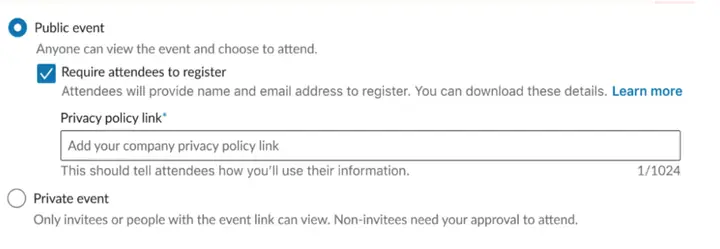
As published: Choose public (searchable, anyone can attend, form optional) for large branding events, or private for closed-door events such as round tables, customer-only and VIP events; the choice can't be changed later.
2026: "All new events created on LinkedIn are now fully public." Existing private events are unaffected, but you may not be able to go Live to them (LinkedIn Help). For a closed-door event, gate it with a registration form and approve attendance off LinkedIn, or invite by message.
The LinkedIn event chat
As published: Attendees can join an event chat group to network; expect little interaction, but those who join are highly engaged.
2026: No longer described in LinkedIn's Help Center for new events. With the event feed removed, the event post's comments and, during a Live stream, the live comments are where attendees talk (LinkedIn Help).
Speakers "need to be a connection"
As published: Type in your speakers' names and they will be invited; you need to be connected to them first. Speakers appear in the event details and can post and share the event.
2026: Unchanged: a speaker is a 1st-degree connection the organiser adds (LinkedIn Help). Speakers can now also be promoted directly as thought leader ads.
"Can I sponsor LinkedIn events?" Yes, with Event Ads
As published: There is a format called Event Ads in Campaign Manager; use it to guarantee reach, because organic invites are slow and limited to people who already know you.
2026: True, and the format has grown: a lead generation objective (Nov 2025), off-platform events (2026) and live viewing during the event. LinkedIn says promoted company events get 4.4x more registrations and 31x more viewers. In the Kiin panel event ads cost a median $49.36 CPM and 39% more per page click than the same advertiser's other single image ads. Format and costs.
"LinkedIn itself is rated as the most trusted social media platform"
As published: LinkedIn is rated the most trusted social media platform, and executives continuously rate it the place to find trusted professional content.
2026: Accurate for 2018 to 2021 only. LinkedIn topped Insider Intelligence's US Digital Trust Benchmark in those years, and Pinterest overtook it in the 2022 edition (Insider Intelligence, 2022); we found no later edition. The executive content claim came from LinkedIn studies of 2012 to 2014. Both are covered on our LinkedIn statistics page.
"Adobe ... managed to get x3 more registrations"
As published: Adobe pivoted Adobe Summit onto LinkedIn because of the pandemic and got 3x more registrations with LinkedIn Events and Live.
2026: Correct, with one nuance: LinkedIn's case study says event registrations were three times higher than Adobe's initial goal, not three times the previous year. It also reports 28,400 views of Adobe's first LinkedIn Live within 24 hours (LinkedIn, Adobe case study).
LinkedIn Events analytics
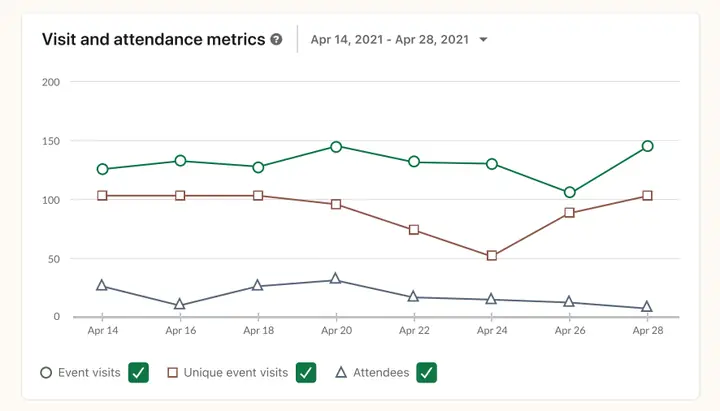
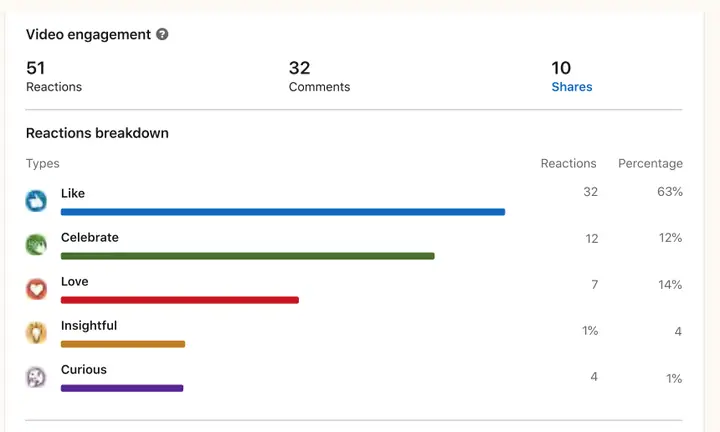
As published: Analytics show visitor and attendee metrics (total and unique visits, attendees), top demographics (industry, job function, seniority, company, location) and post engagement; live and replay engagement are not separated, so screenshot stats after the stream. Attendee details can be downloaded only if a form was used.
2026: Registration metrics and data sit in the event's Analytics tab, Event Ads report registrations, views and clicks in Campaign Manager, and Live analytics give unique viewers and total minutes watched. Downloads still need a form. Details.
Examples: Gartner, Wharton, LinkedIn, Microsoft, Product School, Cisco, Twitter
As published: Gartner's Live interview with its Chief of Research; Wharton with Allianz's Chief Economic Advisor; LinkedIn Marketing Solutions' own event; Microsoft on AI in health; Product School's Virtual Product Summit with speakers from Netflix, PayPal, Facebook and Lyft; Cisco's "Love where you work" talent series; Twitter's day in the life of its product leaders.
2026: These were 2020 and 2021 Live broadcasts, and several of the original links no longer play. The use cases are the same ones LinkedIn lists today: brand and community, product launches, conference keynotes, talent branding. For current ads, see the 2026 examples and our LinkedIn ad examples.
The B2B House's original screenshots (2021)
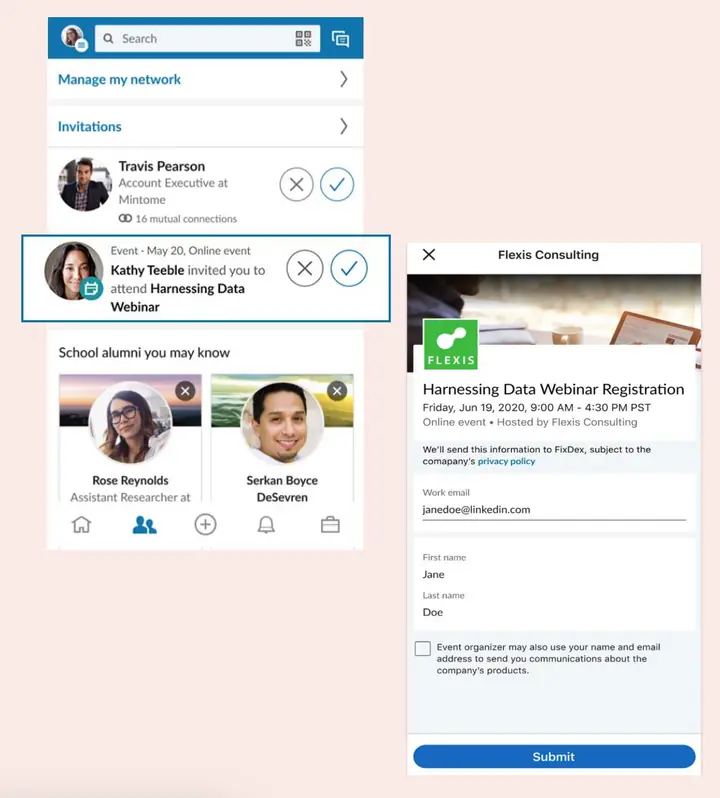
These screenshots come from the original guide. They show LinkedIn's 2021 interface, so some buttons, including the event feed, Recommend Post, chat and private events, no longer exist.
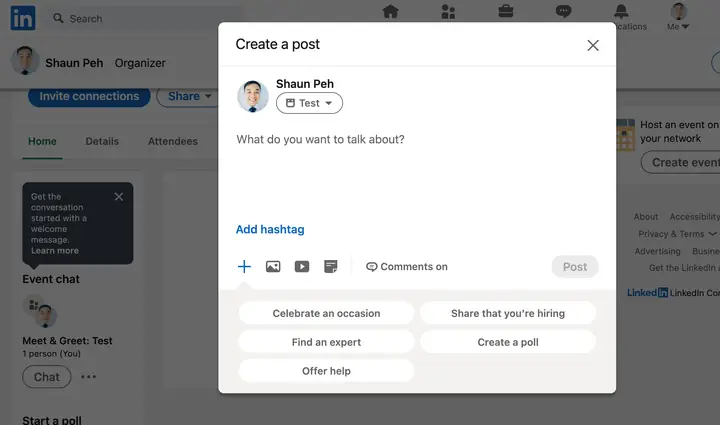
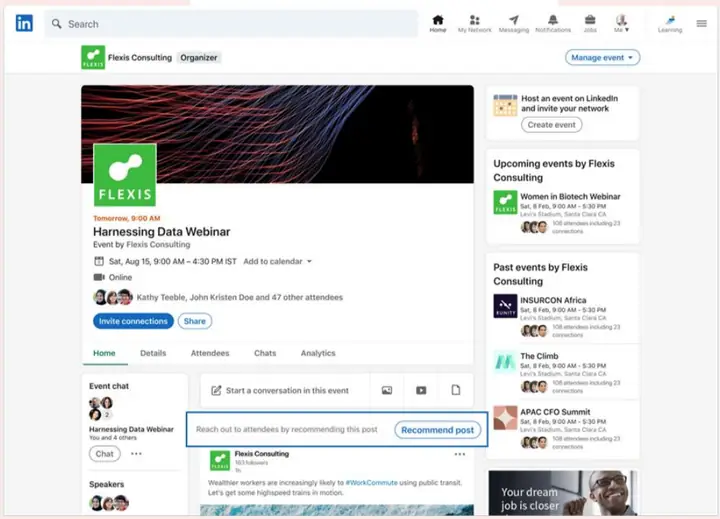
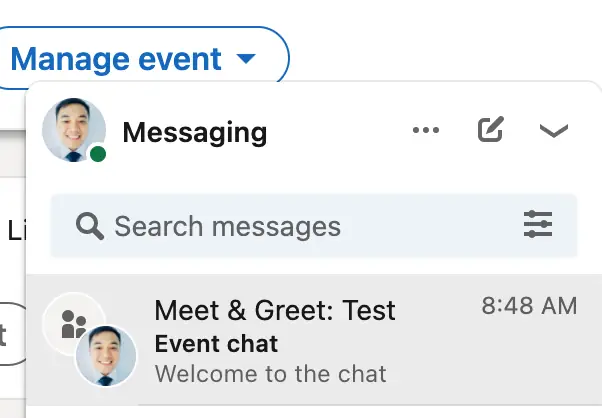
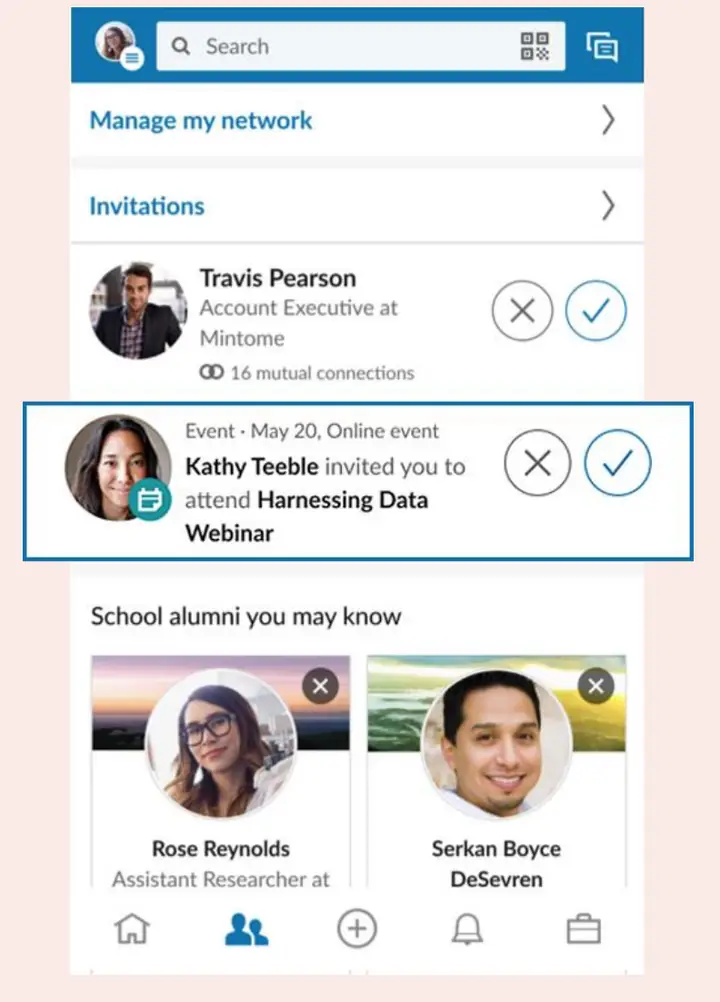
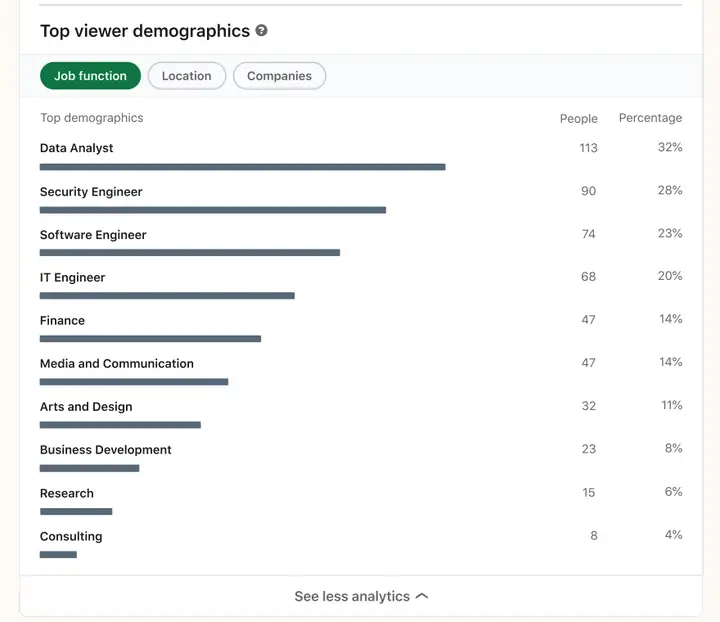
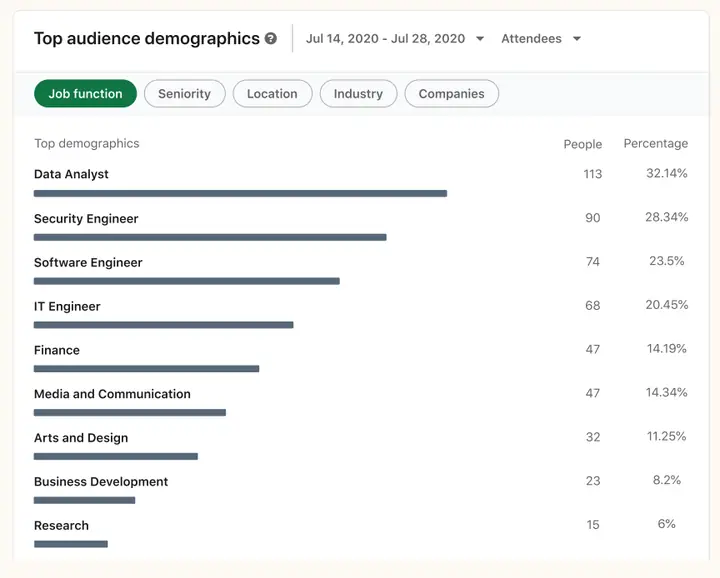
Claims we no longer use
- "Marketers plan to increase their spending by 66% on virtual events beyond 2022." The guide linked it to its own statistics page, and we could not trace it to a survey. The closest published figures are different numbers on different questions, for example AnyRoad's 2021 finding that 58% expected virtual budgets to rise. For a current view of event marketing, LinkedIn's 2025 B2B Marketer Sentiment research (3,251 marketers, Censuswide) found 57% of B2B event organisers saw in-person attendance grow in the past year (LinkedIn News, Nov 2025).
- "61% of members are more likely to take action if [you] ran both an event ad and share it organically." We found no LinkedIn source tying 61% to events. The figure that exists is general: LinkedIn has said Page followers exposed to both organic and paid content are 61% more likely to convert toward a paid action than those exposed to paid only, citing its own data from around 2022 (LinkedIn organic and paid playbook). For events, quote LinkedIn's current 4.4x registrations and 28% later-engagement figures instead.
- "Make your event private for closed-door events." New events can't be private.
- "Go for Hopin as it'll likely be one of the first to become integrated." Hopin sold its events platform in 2023; LinkedIn's integrations are ON24, Cvent and the four broadcast tools above.
- "It's pandemic proof." True in 2021 and no longer the reason to use it. LinkedIn's 2025 research found in-person events rated effective for direct sales by 96% of B2B marketers and online events by 95%.
The original B2B House guide, archived in full
The B2B House is now part of Kiin. So that every link to its guide still makes sense, the complete original is kept below, section by section, exactly as it was last published (only typos fixed). Figures in it are from the dates its authors gave; the sections above give the current numbers and sources. Open any section to read it.
What are LinkedIn Events?
LinkedIn events is one of the newest features of LinkedIn. It helps Organizations to deepen their relationships with their target audience through virtual events and networking.
Oh, yes, LinkedIn events are free for anyone to use.
Think of it as a place where you can build up hype for your event.
You may even engage, chat with your attendees and build a community around your event. After all, LinkedIn is a social network. And LinkedIn events let professionals get social and learn from each other.
What are the benefits of LinkedIn Events?
There are plenty of benefits to using LinkedIn events as part of your virtual event marketing.
• It’s pandemic proof.
• It’s free to create. You may also invite your connections for free. (They do have event ads you may use, but it’s optional).
• LinkedIn’s environment is professional. Hosting your event and building a community on LinkedIn is safe. People are also in the right mindset to learn and engage with your brand/product.
• This is the biggest social network for professionals. If you think Eventbrite is big, LinkedIn is even bigger. And it’s already a social network where it’s just natural for professionals to build a community and form connections.
• You’re able to engage and promote your event before, during, and after your event. There are both organic (free) and paid tools for your to boost your event.
• It’s easier to prove Event ROI on LinkedIn. Event analytics provides Marketers an easier view of their event performance.
What’s the difference between LinkedIn events and LinkedIn live?
LinkedIn live is a broadcasting tool that lets you stream live video within LinkedIn. It helps to drive engagement with your audience.
You don’t need to have LinkedIn live to create a LinkedIn event page. While you may stream LinkedIn live within a LinkedIn event at the moment, you may still use third-party streaming tools instead.
Important note: As of this writing, you still can’t stream directly into LinkedIn events with webinar tools like ON24, Zoom, Webex.
There is news that LinkedIn has invested in the webinar platform Hopin. So if you had to choose a webinar platform to learn, go for Hopin as it’ll likely be one of the first to become integrated with LinkedIn.
How do LinkedIn Events work (Including features)
(Section heading only in the original guide.)
Features & Tools: Pre-Launch of Your LinkedIn Event
These key features of LinkedIn events help you get in front of more audiences:
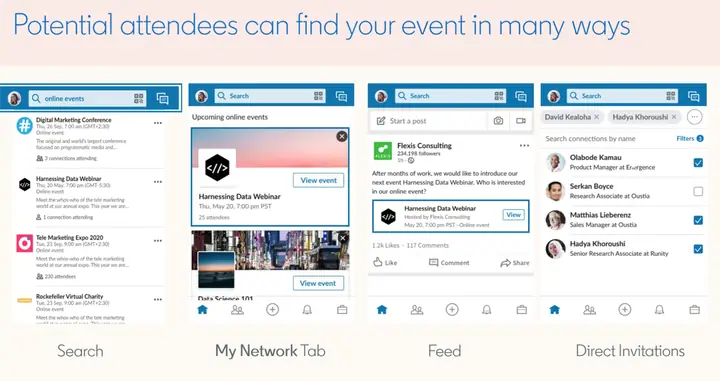
• Organic On-Page Discovery
• Personalized Recommendations via the “My Network” Tab or to a member’s email
• Share and notify your page followers of your event
• LinkedIn events look very different on the feed and stand out.
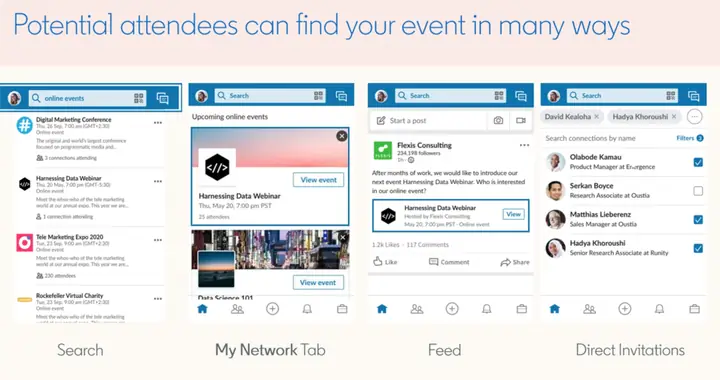
How does LinkedIn Event promotions look like
LinkedIn itself is rated as the most trusted social media platform. Executives continuously rate LinkedIn as the place to find trusted professional content.If you’re a B2B event marketer, having executives in the right mindset to engage with your brand is key. That’s where LinkedIn shines.You will also be able to run sponsored LinkedIn ads for your events which we will cover below.
LinkedIn Events best practice by LinkedIn Marketing Solutions Team
You may also add a registration form to your LinkedIn event to capture any leads.
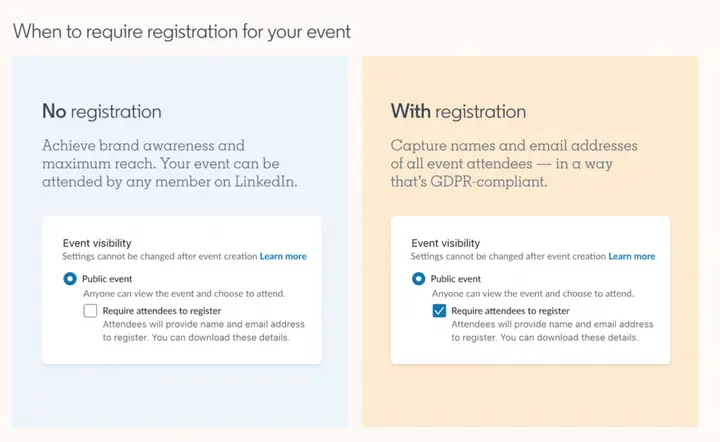
Lead generation and registration form for LinkedIn Events
There are pros and cons to using this form. If the purpose is brand awareness (For eg. Brand events, Thought leadership keynotes, Large online brand conference), then you should not use the registration form.
This will become friction and attendees might choose not to attend especially if they don’t see huge value in the event. Keep in mind, if you want someone’s personal details, there needs to be a stronger value exchange before they surrender their emails.
For lead gen and targeted audience event type, then having this registration form would make sense.
Attendees are notified when the event is a week away and also which of their connections are attending. Another wave of LinkedIn event notifications will be sent 3 days before the event.
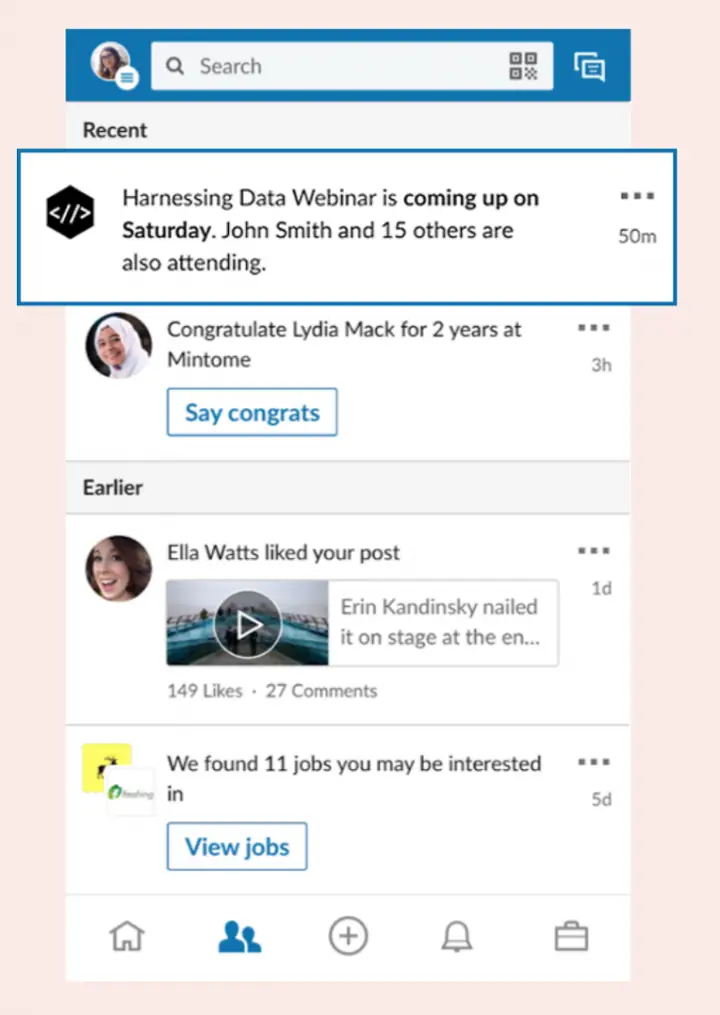
LinkedIn event reminder notification
You may also start to interact in your LinkedIn event feed with your attendees during the pre-launch phase. It looks exactly like a LinkedIn newsfeed with similar functions.
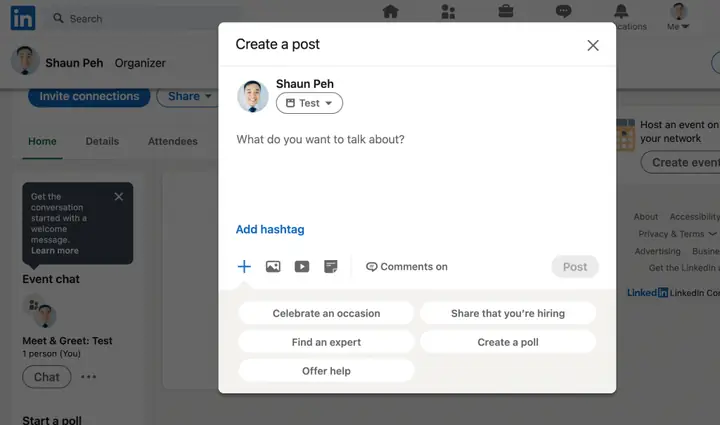
LinkedIn event feed post
You can create a poll, post questions, and thought leadership content to the events newsfeed. I’d recommend posting at least 2-3 times a week in your events newsfeed every week leading up to your event.
You may also push your post out to your attendees up to 2 times a week for free with the “Recommend Post” function in your LinkedIn events feed.
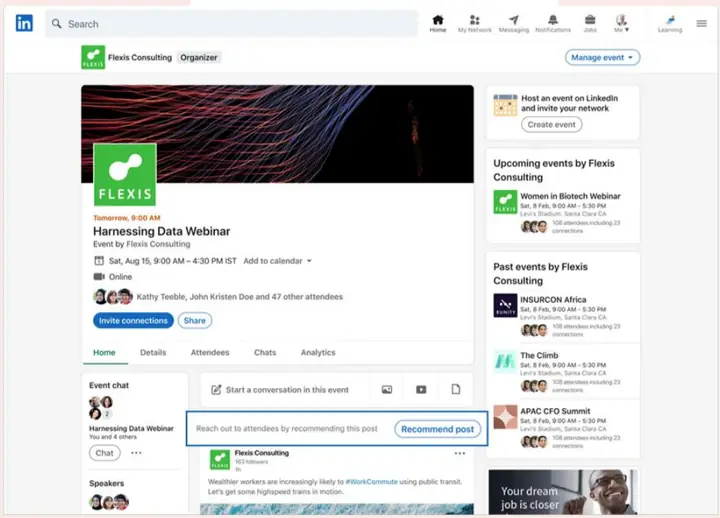
LinkedIn events recommend post feature
Use multi-modal content.
Go beyond a PowerPoint slide upload or a talking head. Engage with different types of attendees with videos, data visualization, audio clips, Q&A, music, etc. Keep the LinkedIn event feed dynamic. One dimensional post might not capture every attendee’s attention.
This keeps your event top of the minds of your attendees. It’ll also keep attendees updated and you can build anticipation to the event with engaging content. Consider getting attendees to share the event and tag their colleagues. Give away prizes for engagement.
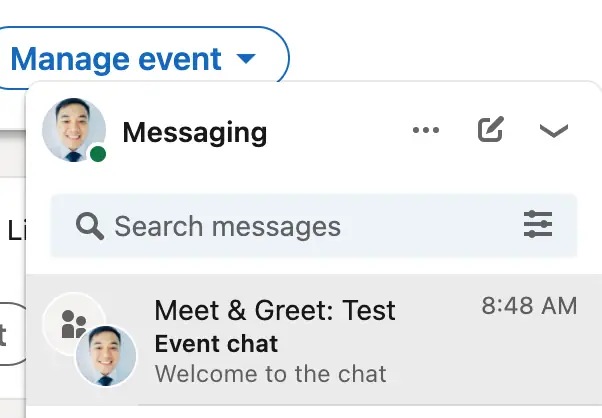
LinkedIn events chat group function
Another amazing feature is the LinkedIn event chat. A chat group is available for your attendees to join. Think of this as a virtual way to network and build connections.
I don’t usually expect a lot of interaction here as many professionals are conservative and less vocal on LinkedIn. They’re more “serious” and don’t usually interact via chat in a fun way.
That said, this is tool is still useful to broadcast messages for those who do join the chat. Attendees who do join the chat are likely highly engaged since they have expressed their openness to interact with others by joining.
Also, remember to post in the LinkedIn newsfeed to remind attendees to use the chat if you’d like.
Many pre-launches of LinkedIn events seem to only have 1 or 2 posts. There’s little effort to raise engagement. This leaves a huge opportunity for marketers who do use these tools effectively together with smart engagement content.
Features & Tools: During Your LinkedIn Events
One of the biggest draws of events is the speakers. LinkedIn lets you invite your speakers into your event. Your speakers will be featured in the Event details section.
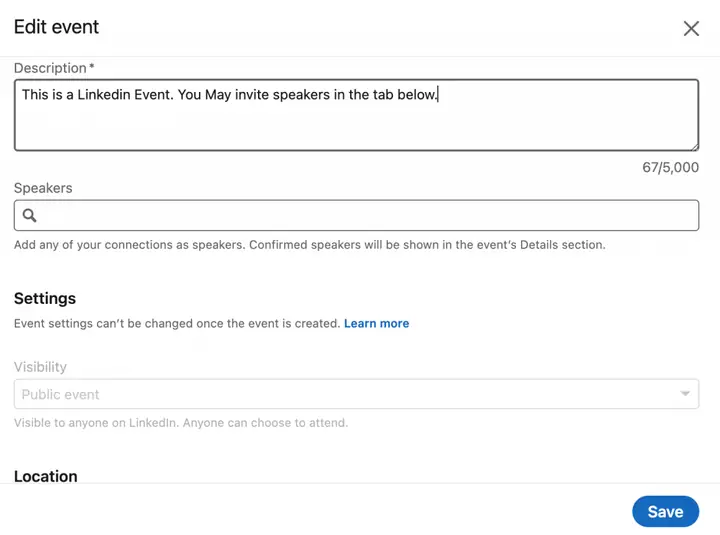
How to invite speakers to your LinkedIn events
Another way to amplify reach and engagement is to encourage your speakers to post on the Event newsfeed. Speakers may also share the event in their newsfeed.
Attendees to your event will get a last notification 15 minutes before your event starts.
If you have LinkedIn live integrated, your attendees will receive a push notification that your event has gone live. This is extremely powerful as it’s a big notification status on their “notifications” tab.
Features & Tools: After Your LinkedIn Events
You may run polls and feedback on your LinkedIn event feed. This will help continue the engagement even after your event.
Attendees may also rewatch the event if it’s posted on the event newsfeed.
If maintained well, this LinkedIn event space can continue to be an engagement hub for your attendees. They may continue to interact with each other and with your brand.
You may also run LinkedIn retargeting ads to your event attendees. This helps you nurture them by guaranteeing they see your follow-up messages.
How to get started with LinkedIn Events?
You may launch LinkedIn events either via your personal page or your company’s page.
Most of the time, it would be launched through a company’s page especially if it’s a corporate B2B Event.
3 essential steps to create a LinkedIn event
(Section heading only in the original guide.)
Step 1:
Within your admin view on your LinkedIn Company Page, click on the “Admin Tools” dropdown. Alternatively, you can also create a personal event from your profile. Simply navigate to the events panel on the left-hand side of your LinkedIn home screen. The rest of the steps are similar.
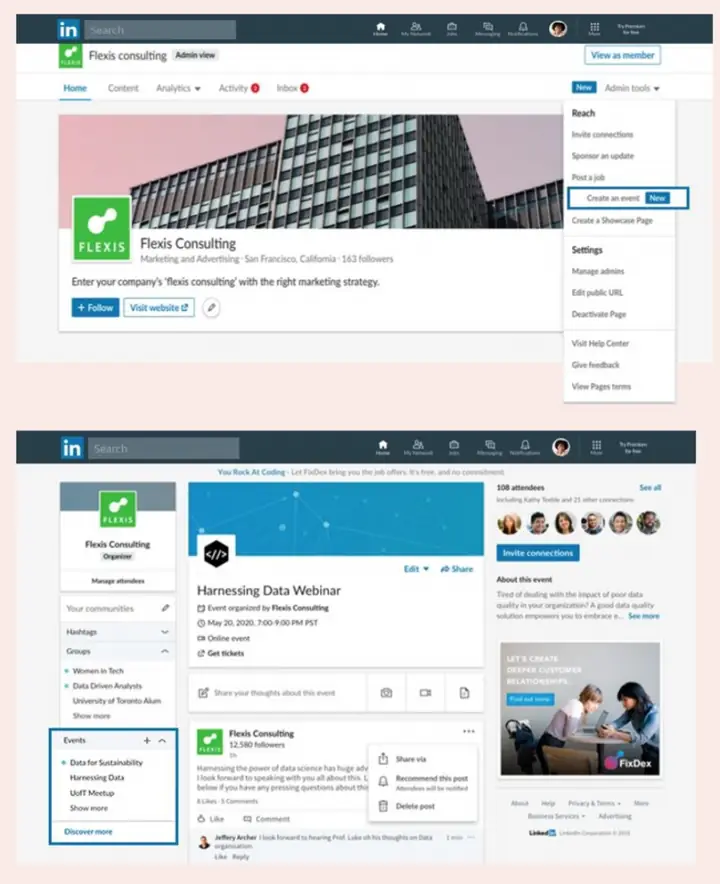
How to create a LinkedIn event
Step 2:
(Section heading only in the original guide.)
Within the dropdown, click on create an Event.
Complete the event detail fields.
• Event Name
• Organizer
• Is this an Online Event? If you say no, you’ll need to add a venue and location
• Broadcast link (This is where you may add a third-party broadcast link. Not needed if you’re using LinkedIn Live).
• Timezone
• Start date/End date
• Description of the event
• Speakers, You may add type in the name of your speakers and they will be invited. You need to be a connection to the speaker first.
• Ticketing Website, Paste the link of the ticketing website, if applicable
• Event Visibility, This can’t be changed after selection. So be very sure here.
You can choose whether to make your event public or private.
If your LinkedIn event is public, you’ll get the following benefits:
• As the name suggests, your event will be searchable by any LinkedIn member. This increases your reach and potential audience.
• Anyone can attend without an invitation. Members can also share the event with their connections.
• You may add a registration form to the event to collect additional attendee details like Email ID. If no form is added, Any member can click on “Attend” and join the event.
Make your LinkedIn event public if the event is a large-scale branding event. Think of it as a public convention where there are no restrictions.
A private event would make more sense for close-door events. For example, virtual round tables, customer-only events, VIP events, or internal company events.
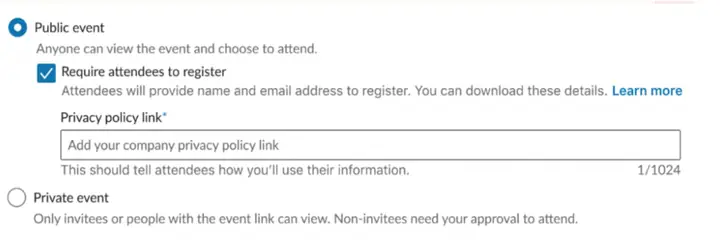
LinkedIn event with public and private event options
If you opt for a public event with the registration form, you will also need to include a privacy policy link.
Step 3:
Once you’ve completed filling in the event details, click on create and your LinkedIn event is created. You can share your page, invite your connections, manage the attendees, post content in the event feed. Attendees will get notified when your event is starting.
If your public event has a registration form, you’ll also be able to download the attendee details on your LinkedIn event page.
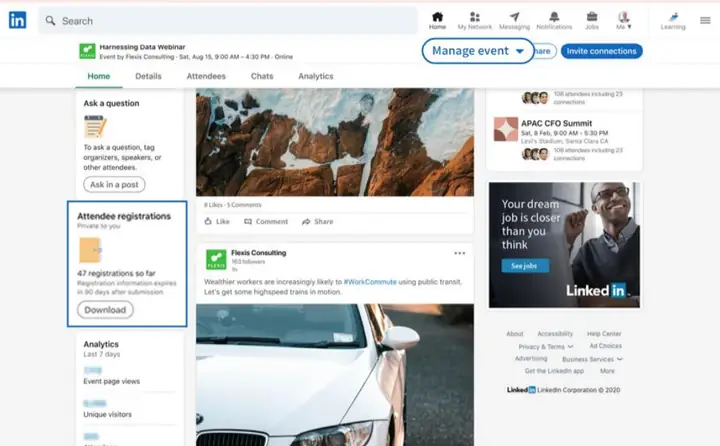
LinkedIn Public Event With Registration Forms
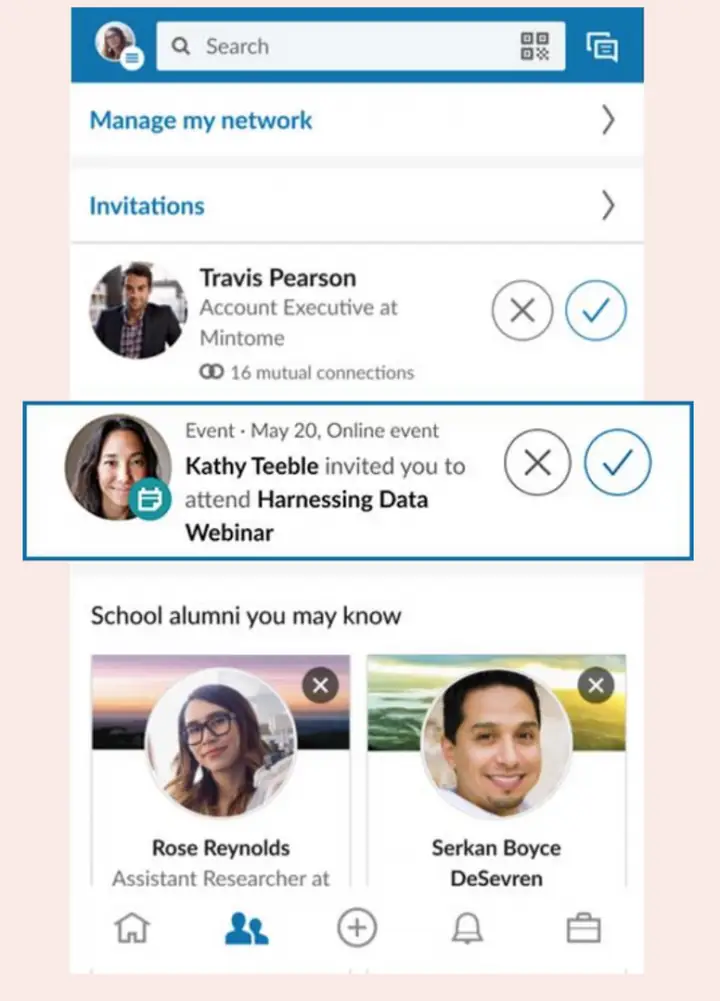
How does a LinkedIn Event Invite look like?
When you’ve invited your connections to your event, it will look like the image below:
How Does a LinkedIn Event Invite Look Like
If you created your LinkedIn Event as public without a registration form, members will join the event when they click on the checkmark. Without a registration form, event organizers can still view all the attendees but their details cannot be downloaded.
If a public LinkedIn event was created with a registration form, a form will pop up when the member clicks on the checkmark.
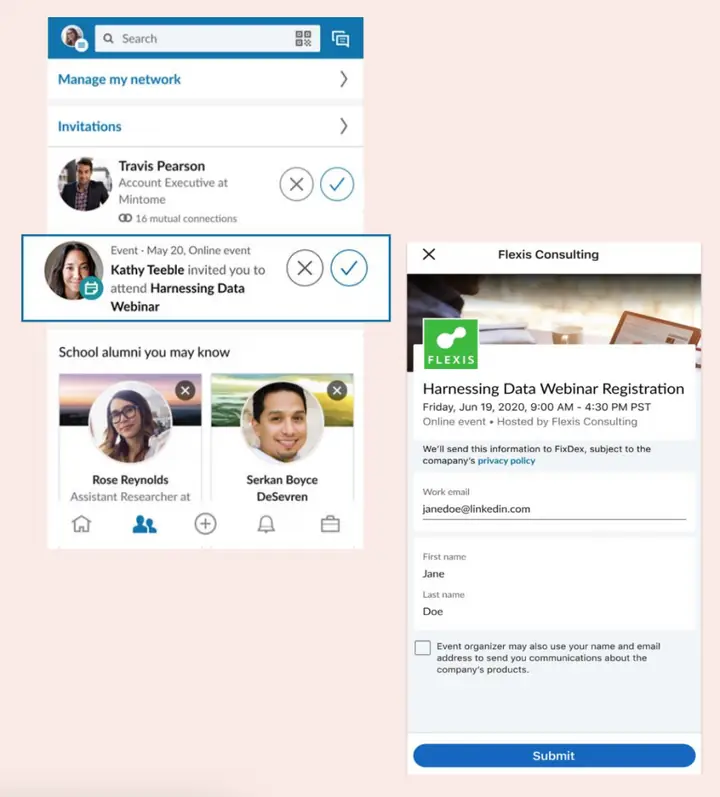
LinkedIn event with a registration form
Attendees will need to submit their details before they can attend.
Although the form fields are not editable at the moment, you’ll be able to download the attendee’s email, first name, and last name.
Can I sponsor LinkedIn events (LinkedIn event ad)?
Yes, there is a format called “Event Ads” within the LinkedIn Campaign Manager Tool.
If you want to guarantee reach to a certain professional audience, then you’d want to run LinkedIn ads to boost your event attendance.
Inviting your connections and sharing organically is slow.
It is also very limited to who you can reach too (Not unless they explicitly search for your event, which I’m sure many will not since they don’t even know your event exists).
LinkedIn has also claimed that 61% of members are more likely to take action if they ran both an event ad and share it organically.
This is how a LinkedIn Event Ad will appear on a member’s newsfeed.
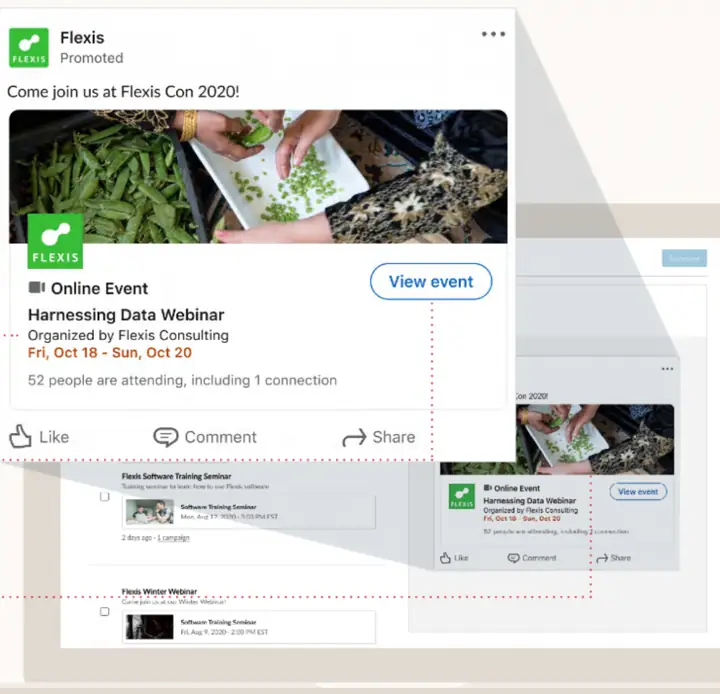
How does a LinkedIn Event Ad Look Like
How can companies use LinkedIn events to promote virtual events (Examples & Best practices)
Other than being online, LinkedIn events aren’t different from live events. What works offline can be applied online. Just a change in the execution of the medium.
Here are a couple of examples of top brands that are winning with LinkedIn Events.
Branding, Community-building, interviews, and Live QnAs
In this example, Gartner went live on LinkedIn with their Chief of Research to discuss how to support people, employees, and the organization during the pandemic outbreak. Here’s the link to the LinkedIn Live interview.
Here’s another best practice by The Wharton School. They went live with the Chief Economic Advisor of Allianz on their branded topic “Unusual Certainty”. You may watch their live show here
Use LinkedIn Event for a targeted audience
LinkedIn is also a LinkedIn event. You can see how LinkedIn Marketing Solutions uses a LinkedIn event to build to help marketers specifically. Microsoft also went live and used the LinkedIn event capability to share about how AI is helping the health industry. This is more of a conference which is still possible with LinkedIn events.
Use LinkedIn Events to house your conferences
The product school launched its biggest event of the year on LinkedIn, The Virtual Product Summit. They also featured top speakers from Netflix, Paypal, Facebook, Lyft, and more.
Adobe also pivoted their Adobe summit on to LinkedIn due to the pandemic. They managed to get x3 more registrations with LinkedIn Events and Live
Talent Branding
LinkedIn is perfect if you’re also overseeing employer branding.
Here’s an example from Cisco where they launch a series of LinkedIn events called the “Love where you work” series. They were able to bring Cisco’s brand to life. Twitter also hosted an event featuring a day in the life of their product leaders
How to use LinkedIn Events Analytics
It’s always been extremely difficult to justify the ROI of conferences, trade shows, and events. With LinkedIn Events Analytics, you’ll be able to prove value to event marketing efforts.
Marketers/Events organizers can see the attendees list with or without a registration form. However, the attendee’s information can only be downloaded if the registration form was used.
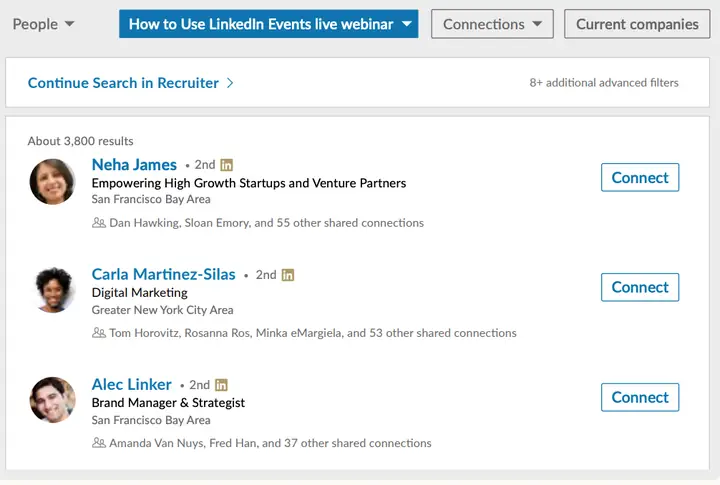
LinkedIn event attendee list
Here the are LinkedIn Event Analytics measurements available.
• Visitor and attendee metrics, including total event visits, unique event visits, and attendees
• Top demographic metrics, with industry, job function, seniority, company, and location breakdowns by visitors and attendees
• Post engagement metrics, including reactions and comments on every event feed post
Do take note that Metrics for only the live session are not separated from the replay engagement numbers. Take a screenshot of your engagement stats right after the live stream so you can compare the two later.
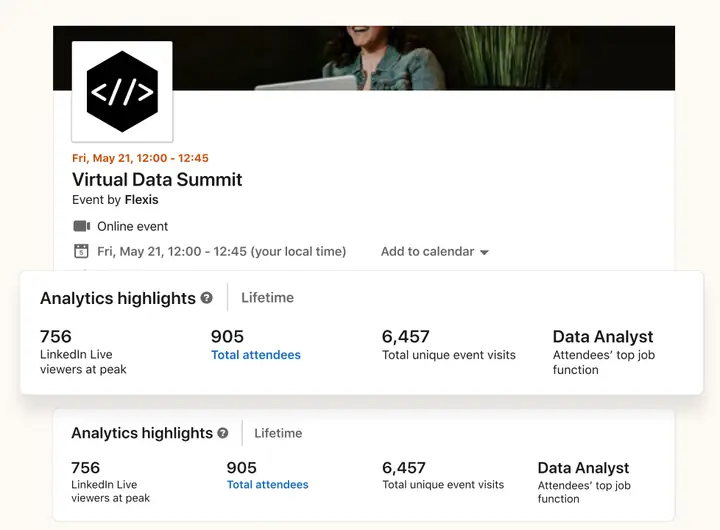
LinkedIn event analytics view #1
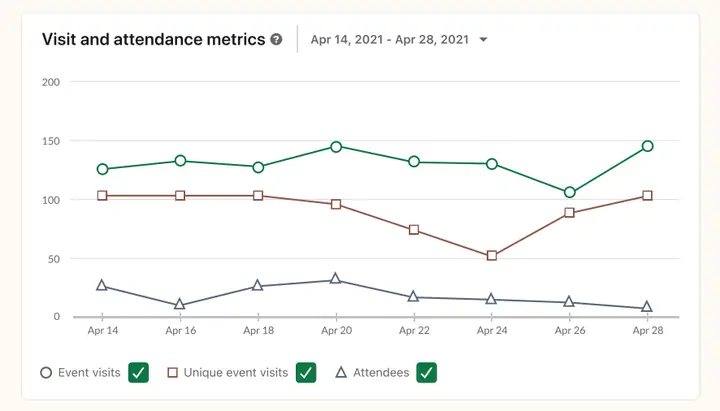
LinkedIn event analytics view #2
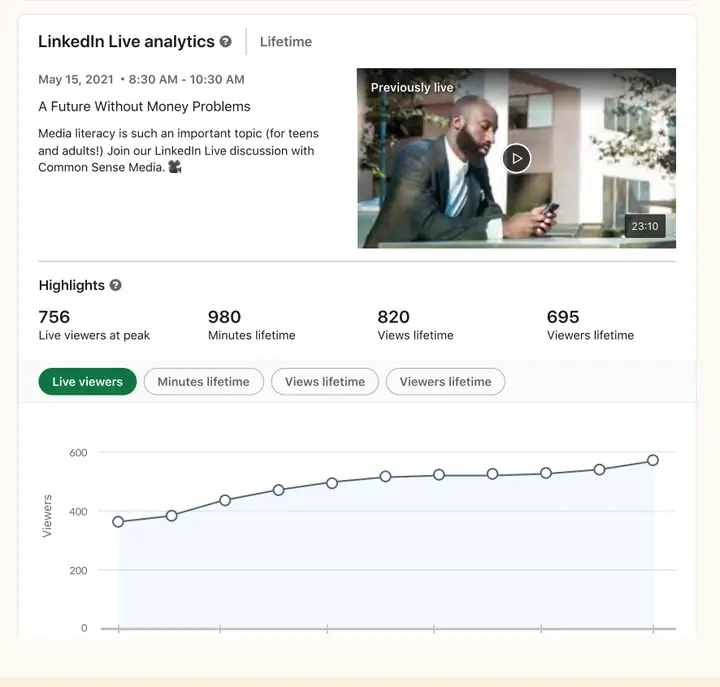
LinkedIn event analytics view #3
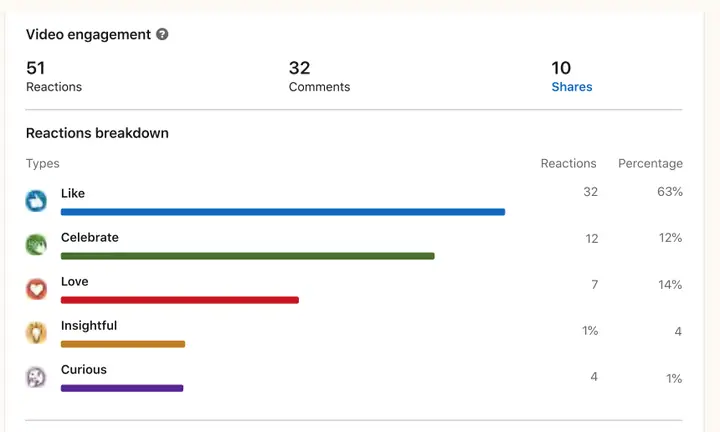
LinkedIn event analytics view #4
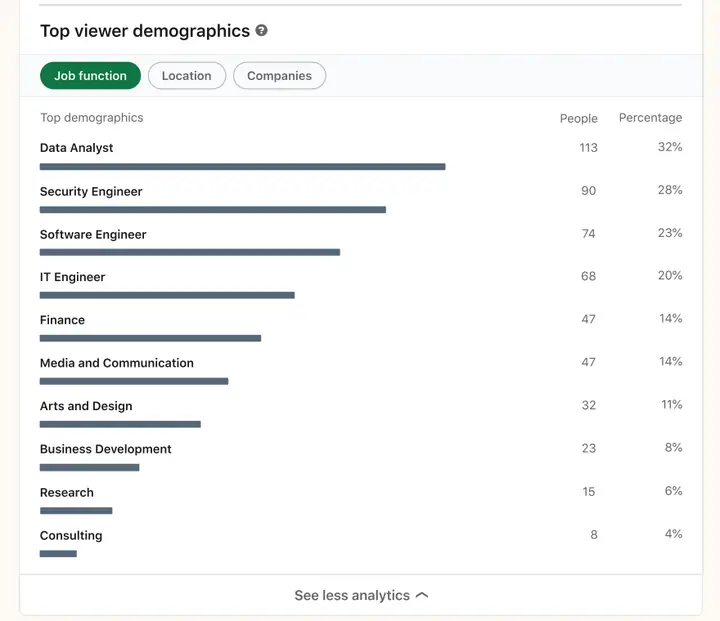
LinkedIn event analytics view #5
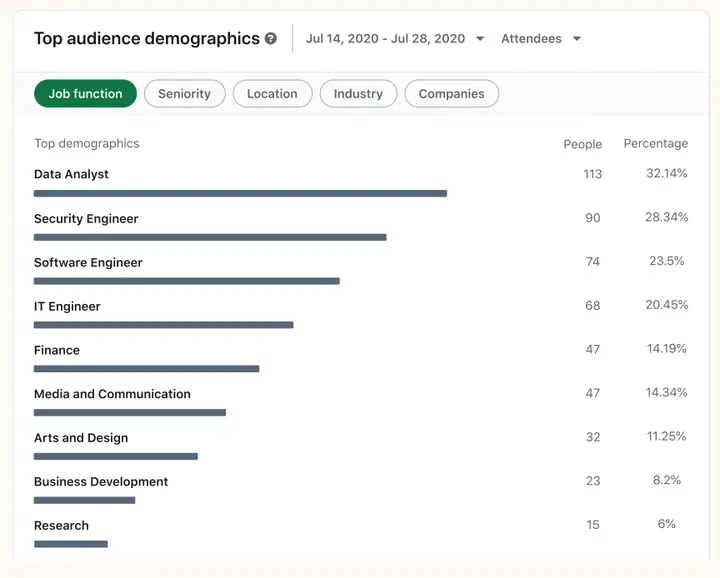
LinkedIn event analytics view #6
Should you use LinkedIn Events?
LinkedIn is the biggest professional network in the world. Ask yourself if your target audience is on LinkedIn. If they are, then LinkedIn Events is a perfect way to support your event marketing while offline events are still not safe.
You should also get a hang of this because even if Offline events come back fully, those will likely be a hybrid of Online as well.
Also, LinkedIn events provide free distribution, analytics, and content management tools! It’s something you should seriously consider as a permanent way to run online events.
• Tags:
• B2B Marketing Strategy
• linkedin events
• linkedin marketing
• virtual events
LinkedIn Events: frequently asked questions
Are LinkedIn Events free?
Yes. Creating a LinkedIn Event, inviting connections, adding a registration form and streaming on LinkedIn Live cost nothing on LinkedIn's side, though Live needs a third-party broadcast tool. Paid options are Event Ads, boosting the event post and Thought Leader Ads. In the Kiin panel event ads cost a median $49.36 CPM (75 accounts, 2026).
How do I create an event on LinkedIn?
From a LinkedIn Page admin view, click Create, then Create an event. Choose Online or In person and, for online, LinkedIn Live or an external link. Add the name, time zone, dates, description, speakers and an optional registration form, click Next, add intro text and click Post (LinkedIn Help, 2026).
What is the difference between LinkedIn Events and LinkedIn Live?
A LinkedIn Event is the event page people sign up on. LinkedIn Live is live video streaming, one of the formats an online event can use. To go live you need more than 150 followers or connections, an account at least 30 days old and a third-party tool such as Restream, StreamYard, Socialive or Switcher.
How many people can I invite to a LinkedIn Event?
Each Page admin can send up to 1,000 invitations a week, shared across all events, and only to their own 1st-degree connections. Attendees can invite their connections too. Page followers who aren't connected to an admin can't be invited, so share the event on the Page.
Can a LinkedIn Event be private?
Not any more. LinkedIn says all new events are fully public; private events created before the change are unaffected. To restrict who joins, use a registration form and confirm attendance yourself.
How long can I download LinkedIn Event registrations?
Registrant data is downloadable for up to one year from the day each person registers, and there can be a four to five-day delay before a registration appears in the download. Sync the form to your CRM through Zapier or the Lead Sync API to avoid the delay.
What are LinkedIn Event Ads and what are the specs?
Event Ads promote an event to a targeted audience before, during and after it. For a LinkedIn Event the image is 4:1, pulled from the event page, intro text is up to 600 characters and the event name up to 255. Objectives are brand awareness, website visits, engagement and, since November 2025, lead generation. Since 2026 they can also promote off-platform events.
How much do LinkedIn Event Ads cost?
In the Kiin panel, event ads cost a median $49.36 CPM and $21.61 per landing page click, with a 0.25% landing page CTR (75 accounts, Sep 2025 to Sep 2026). In the same account they cost 39% more per page click than other single image ads. A webinar registration cost $410 through a lead gen form and $809 through a landing page.
Do LinkedIn Event Ads work?
Promoting an event works: LinkedIn says company events promoted with Event Ads get 4.4x more registrations and 31x more viewers than unpromoted ones (LinkedIn internal data, 2025). Whether the event ad is the best format is less clear: in the Kiin panel only 28% of event ad clicks reach the registration page, so test it against a single image or thought leader ad.
When does LinkedIn send event reminders?
For events organised by Pages, attendees get reminders 7 days, 3 days and 15 minutes before the start. When a Live event starts, LinkedIn notifies all registered attendees and a subset of the organiser's followers.
How we built this page, and every source
We started from every section and claim in The B2B House guide and every claim other sites link to it for (we checked its backlinks one by one). For each, we read LinkedIn's current Help Center articles, LinkedIn Marketing Solutions pages, LinkedIn's newsroom and its developer documentation on 14 November 2026. Where LinkedIn has not published something itself, such as the specs for off-platform event ads, we cite the trade press report and say so. Kiin figures come from the Kiin Labs panel ($65M+ in LinkedIn spend, 1,000+ accounts), described in our method note. Corrections: [email protected].
- LinkedIn Help, LinkedIn Events overview
- LinkedIn Help, Create an Event from your LinkedIn Page
- LinkedIn Help, LinkedIn Events organized by Pages FAQ (invitations, reminders)
- LinkedIn Help, Registration forms used for Events organized by Pages
- LinkedIn Help, Recent changes to LinkedIn Live and Events
- LinkedIn Help, Create and host LinkedIn Live: access criteria
- LinkedIn Help, Schedule your LinkedIn Live event from a third-party broadcast tool
- LinkedIn Help, Create event ads for LinkedIn Events in Campaign Manager
- LinkedIn, Event Ads specs
- LinkedIn, Event Ads
- LinkedIn, Event Ads for registrations
- LinkedIn Marketing Solutions, LinkedIn Live and Events
- LinkedIn News, Turn every event into a growth engine with LinkedIn Events, 10 Nov 2025
- LinkedIn Marketing API, Event Management overview (updated May 2026)
- LinkedIn Pressroom, About Us
- LinkedIn, Adobe case study
- LinkedIn, organic and paid playbook
- PPC Land, LinkedIn overhauls event ads with off-platform targeting and lead gen forms, 11 May 2026
- PPC Land, LinkedIn now puts event ad viewership lift at 31x, Aug 2026
- TechCrunch, Hopin sells its events platform to RingCentral, Aug 2023
- Insider Intelligence, Digital Trust Benchmark 2022
- LinkedIn Ad Library, Proxify ad and Keboola ad
- Kiin Labs, LinkedIn Ads Benchmarks 2026, live and events and 150 LinkedIn Ads Statistics, events and webinars
Ilic, P. (2026). LinkedIn Events 2026: How to Create, Promote and Advertise an Event. Kiin Labs (incorporating The B2B House). kiin.co/blog/linkedin-events. Free to cite with a link.
Running webinars or events on LinkedIn? Send read access to your LinkedIn Ads account and we'll show you what your registrations cost against 1,000+ connected accounts, and which format fills your events cheapest. Free, read-only, one page.